It’s been a while since my last post, but I just finished putting a Graylog container behind a Caddy reverse proxy, and because I found the existing documentation to be pretty sparse I thought I would quickly share my Caddy docker-compose.yml and my Graylog docker-compose.yml, and other tidbits that might help others out.
Last week I published my fourth quarantorial in which I shared my thoughts and a recap of #ServiceNow #Knowledge2020, as well as some thoughts on the evolving human and enterprise condition.
Before I get into opining on various topics, let me say that I do believe what Bill McDermott said in the context of ServiceNow in his keynote, but I believe it on a much broader basis.
Bill McDermott, CEO of ServiceNow said, “The workflow revolution has only just begun, and ServiceNow will be the catalyst to redefine the enterprise, not as it is today. But as it must be tomorrow. There’s no way we can live with the cycle times of innovation that are going on with systems that are too slow, too antiquated to achieve what we all want. We all want great experiences for our teammates and for our customers. And we have to remember that behind every one of those great experiences is a great workflow.”
I might go as far as to say, the revolution has only just begun, and humans (people) will be the catalyst for redefining the world the way we have since the dawn of time, we will experiment and find a new tomorrow that we will live with until new variables and catalysts present themselves and we begin to experiment again. As time moves forward, new innovations will deliver more data, greater transparency, a lower the barrier to entry, etc. and as a species we will increase our velocity and frequency of experimentation, looking to innovate and disrupt to build a better tomorrow, the outcome won’t always match the intent, but hopefully, we can avoid extinction, only time will tell. Generally speaking, I do believe that as a species we all want a great life for all those who inhabit this planet with us, but we have to remember that in science a control set is used as a consistent test sample for experimentation. Scientifically the circumstances under which we conduct experiments and by which we will measure the outcome of our experiments matters. In science the control set is a constant used by everyone conducting experiments to measure their results, in the experiment of life, there is no control set which means that the same experiment performed in seemingly the same way will deliver different results. The control set is flawed, thus experiments are flawed, thus the resulting outcomes will continue to inconsistent, flawed, and vexing. What matters to me is that we realize this and compensate for it, that we recognize that we are volatile, that we are the catalyst, and that it’s unlikely as a species that we will become a stabilizing agent.
As quarantine protocols begin to loosen here in New Jersey, this quarantorial is somewhat of a reflection on my previous quarantorials, and some observations I have made while in quarantine.
I will start with an article written in Fast Company that got me thinking about the idea of the extrovert dilemma and the introvert advantage. This article, belief in tomorrow’s knowledge economy, a rapidly changing value chain, and the digital nomad’s ascension on this value chain fueled many of my thoughts. These thoughts sort of wander between personal observations, observations of others, and observations of the overall human condition.
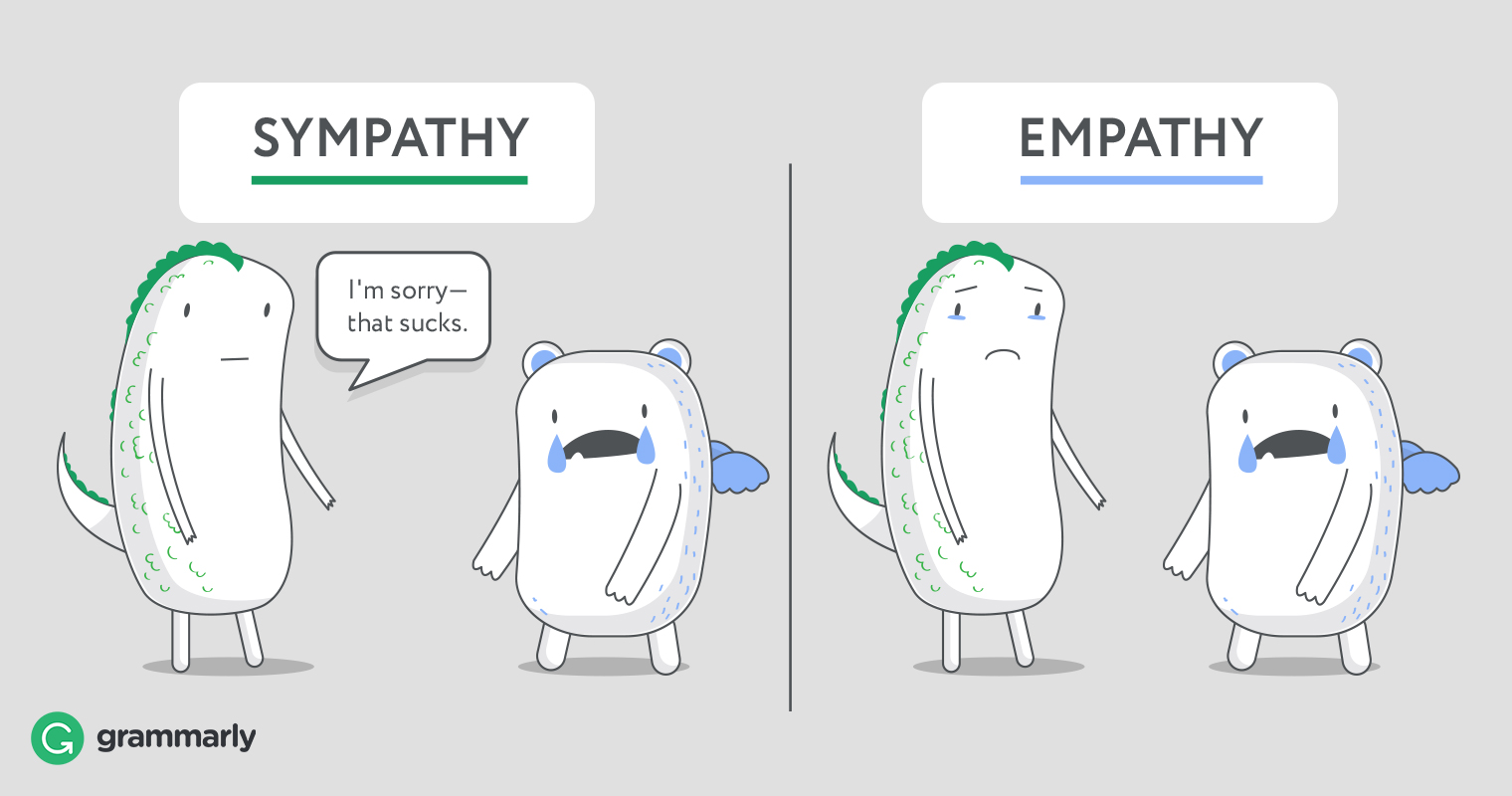
As someone who believes deeply in a culture of autonomy, purpose, and mastery, I see the cultural changes taking place, the vision of the #futrureofwork, and the innovation happening as goodness. While the catalysts may not be positive ones, they are catalysts nonetheless. Catalysts are often volatile, and sometimes the reaction created by the introduction of a catalyst is unexpected or unintended, but this is the risk of experimentation and the introduction of a catalyst. Yes, I believe every day we wake up to conduct and participate in experiments, this experiment called life looks like any other experiment, it has constants, variables, and catalysts. These experiments threaten those with legacy mindsets that favor the known, living off the experiments of others, too afraid to experiment themselves and favoring the way things have always been vs. the unknown, the way things will be. In 47 years of life, I can’t recall a catalyst that has so clearly yielded an introvert advantage. While I believe it will be a short-term advantage and introversion will return to a perceived social disadvantage I hope that what we have learned through observation will lead to a long-term positive outcome on the world. I feel for the extroverts who have struggled over the last three months, sympathize, not empathize because I have no idea what they feel. After all, I am an introvert who has been incredibly comfortable in quarantine and, most importantly, I am not them, I am me.
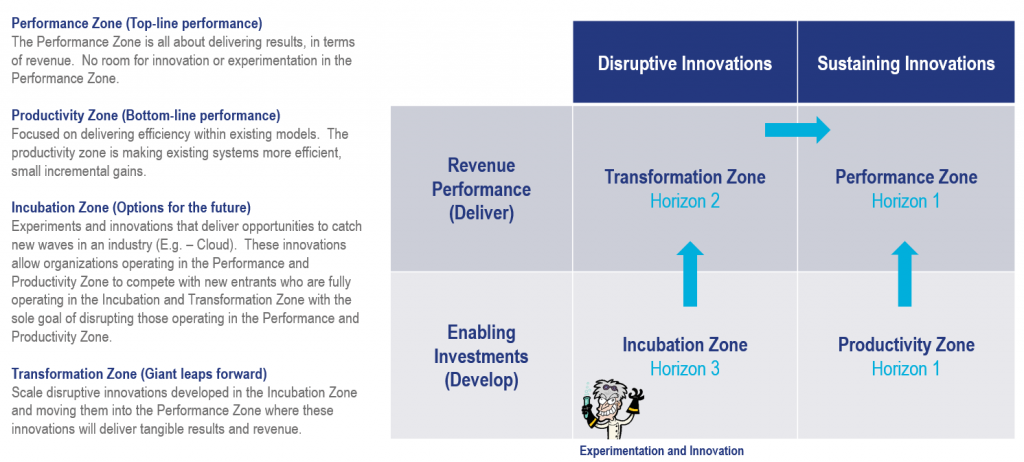
Change is not easy; it can be uncomfortable, scary, and paralyzing, but as someone comfortable with change, I am energized by innovation and disruption. I embrace the risks because I know they unavoidable and I don’t want to be paralyzed by an unwillingness to experiment, but I also follow a scientific method to try to foresee risks and reduce the blast radius. This got me thinking about those I view as risk-averse, and how and when they choose to take risks. Jumping from your second-story window, risking a broken femur when your house is on fire doesn’t make you a risk-taker, it makes you a survivor. Too often we see those comfortable with the status quo want to take risks when it’s too late, when the blast radius can’t be controlled, this is a legacy mindset that favors the status quo over experimentation. Experimentation never ends, it has to be part of the cycle, it’s not easy to disrupt comfortable, but waiting until desperation strikes to act as a motivator is a bad idea with a very big blast radius. In established operating models this can be really hard, this is why I like Geoffrey Moore’s Zone to Win concept. We need a model that allows us to innovate and disrupt in a controlled way, those operating in the Incubation Zone can’t be encumbered by the controls that exist in the performance zone, a move towards tomorrow can’t be restricted by today. The blast radius in the Incubation Zone is smaller and it’s this operating paradigm that should accelerate the velocity of innovation, the frequency of experimentation, and provide the freedom to blow shit up.
Source: Moore, G. A. (2015). Zone to win: organizing to compete in an age of disruption. New York: DiversionBooks.
I am comfortable alone; I can sit still and concentrate for extended periods; I can persevere in situations that are highly uncomfortable and seemingly never going to change or get better. In a pre-COVID world this was the introvert’s unrecognized and often undervalued advantage, but in a COVID world the relative measures changed, introverts were less or not impacted at all by solitude, while extroverts in some case suffered severe effects. I continue to work on how I approach things to be more palatable to the general public without compromising who I am, my intensity, and the velocity at which I operate. As I get older, I am developing a more profound respect for who I am inherently and a lot more respect and gratitude for the shadow that chases me every day.
While what we are experiencing right now as a result of COVID-19 is indeed strange, it is indeed an extrovert dilemma, a dilemma faced by me and other introverts our entire lives. This dilemma can be overcome through the discipline to do what is required and not indulge what we desire, I say this not theoretically, but as someone who has worked most of their life to do just this.
To maintain a team connection, our team has been holding virtual events multiple times per week. We’ve held a virtual two-day kickoff meeting, we’ve done presentations on our mentors, we’ve done murder mysteries, we’ve played the Newlywed Game, and now we are playing the $10,000 Pyramid. We kicked off a book club, and we are reading (hopefully almost done) Malcolm Gladwell’s David and Goliath, which like most of Gladwell’s books offers some solid concepts, a few that stuck with me were:
Success requires risk-taking, a willingness to upset others, and the mental strength to stay the course.
Privilege and advantage are not correlative.
Trauma and courage and resilience are correlative. The struggle to battle adverse conditions and survive teaches us more than we know.
Unconventional tactics can change the game.
As an introvert, living in a world that values extroversion, I feel like I’ve had to battle my natural inclination and desire for solitude most days of my life. This battle can be hard to understand by those who don’t live it, in the same way that understanding how the loss of socialization impacts and extrovert can be hard for an introvert to understand. My battles go beyond simple socialization to the distractions of discussions while I am trying to focus, to observing others wasting what I perceive could be productive time, etc. The exhaustion of being an introvert in an extrovert world is neverending. For me, it is further complicated by hypersensitivity to outside stimuli, an inability to control my surroundings, and what often equates to disconnect in motivations and expectations. When it comes to adapting and overcoming, being disciplined has played a significant role for me; in my mind, I simplify things, remove choice, and focus on objectives. As a result, I have built courage, resilience, and become mentally tough.
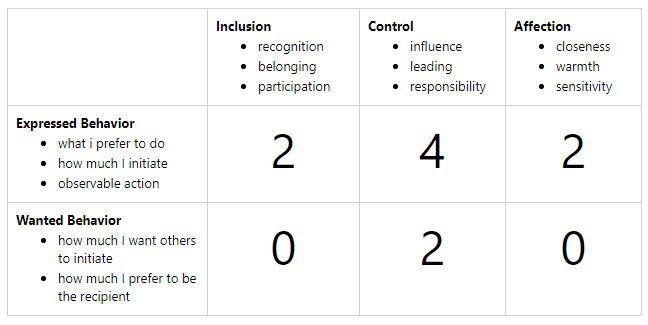
Many years ago I attended a Leadership Training at the Center for Creative Leadership, most people have heard of the Myers-Briggs (MBTI), I am an INTP-A, but I had never heard of a FIRO-B, but as part of the pre-work for the training, I completed a FIRO-B assessment and it was analyzed in a 1:1 session while I was at the training. It was one of the more enlightening exercises for me from a social interaction perspective because it contrasted what I desire and give against what others give and desire. I am not going to provide an interpretation of my FIRO-B below, but the scale is 0-9, with 0 being lowest and 9 being highest. As a result of this exercise, today, I think I am better about disclosing who I am, and I am better at trying to understand what others need and accommodating it. I am still me so I won’t over-rotate here on my ability to accommodate, but my attempts are in earnest.
My FIRO-B Results
Three years ago, I sat in a corporate event listening to a motivational speaker talk about positive motivators; the entire time, the guy was talking, I thought to myself, does this pollyanna approach to motivation actually work for people? With a follow-up thought, what happens when it doesn’t work? What happens when you fill your brain with nothing but positive thoughts, and everything that happens is bad? So bad the horizon is not visible, where you have no idea if or when things will improve? Can you survive? Can you go on? When the speaker called for questions, I raised my had and asked: “What do you do if you feel like someone is chasing you all the time? You can’t see them, but they are chasing you every minute of every day?” This guy was at a loss for a response, other than to give me a look that said, seek professional help.
This past weekend I watched “Joe Rogan Experience #1492 – Jocko Willink.” I called my wife over at the snippet below as I gleefully grinned, saying, see, there are others out there just like me. (Note: If you are offended by foul language, do not watch.)
To all those not being chased by someone, to all those whose glass is half-full, I sincerely hope the water is always there to refill your glass. The good news is when there is no water, there will be people like me who wake up every day, not wondering if the water will run out, but when. We live our lives every day expecting the unexpected, we enjoy the good and plan for the worst, and we train our brains to conduct measured responses. We are not sad, we are not depressed, we are not confined by our fears we are liberated by them, we are mentally tough and prepared for whatever the experiment called life will thorough at us, we will not ever wallow in despair, we will take action and we will hold ourselves accountable.
In the end, we are all different, we all possess opinions, none of us fully shaped our opinions so in many ways we carry the opinions formed through by context and circumstance of our lives, and none of this is inherently dangerous, it’s human. Where things get dangerous is when we get locked in, when we shut down to new context and circumstance, when we chose to cast a shadow in an effort to hold onto what was rather than shine a light on what should and will be.
It’s week five of Knowledge 2020 and it feels like it started a lifetime ago, but it was only a month ago.
I am an avid online learner, I love online asynchronous content delivery platforms and I consume content regularly on platforms like Coursera, edX, and Udacity. I’ve completed two Masters degrees online, and I am currently studying in an online doctoral program, so I feel like I have a pretty good perspective on what makes for a good virtual experience, so I wanted to start with my impressions of the event. As expected, the keynotes were good, but for these are high-powered presenters, a keynote is pretty easy to deliver online, but all the other content at a professional conference is often more relaxed and interactive from a delivery perspective, and this is not as easy. Knowledge 2020 is not the only virtual conference that I attended over the last few months, my favorite online conference was actually the Virtual Maker Faire, maybe it was the community aspect, its raw nature, the high-quality content delivered by highly passionate makers, maybe it was the 24-hour sprint format, but it was a great event. I have to say I don’t love the 5-week long format that ServiceNow used to deliver Knowledge 2020. I have waited weeks to write this summary, waiting to hear Bill McDermott’s keynote, it did not disappoint, but I think I stuck with Knowledge 2020 because of what I heard during Bill McDermott’s interview with Jim Kramer on CNBC’s “Squawk on The Street” at the end of April.
During his CNBC interview, McDermott masterfully lays out the market opportunity, ServiceNow’s pivotal role at the center of a 7.4 trillion dollar investment in digital transformation. McDermott talks about ServiceNow as the workflow engine of the 21st-century economy, how ServiceNow lives at the intersection of the web, mobile, social, and enterprise systems of record. McDermott discusses how ServiceNow makes work, flow within the enterprise to create great experiences for employees and customers. McDermott highlights that creating great experiences for employees and customers has never been more important than it is right now, amidst COVID-19 and the mass shift to work-from-home or more aptly stated work-from-anywhere.
During the CNBC interview, McDermott stated that ServiceNow’s quarterly platform subscription revenues were $995M, up 34% a year ago, with 37 transactions over $1M in net new annual contract revenue, up 48% from a year ago with 933 customers with annual contracts revenue exceeding 1M. As McDermott spoke, he reaffirmed my belief in a work-from-anywhere culture, consumerization within the enterprise, the subscription economy, and the value of predictable contract revenues. Predictable subscription-based services deliver predictable revenue streams and allow organizations to build models focused on customer value, rather than quarterly revenue and earnings targets. I think the other thing that shined through during this interview was the agility, elasticity and velocity of the public cloud, including SaaS (software-as-a-service) based services like ServiceNow.
McDermott discusses ServiceNow’s ROI (return-on-investment) as being at least 5X the investment made in ServiceNow. This message resonates in the C-Suite, where the focus is on protecting revenue, business continuity, increasing velocity, and agility while managing risk; this message is harder when you are not in the C-Suite.
Finally, as someone who has practiced my craft and passion professionally for nearly thirty years, with twenty-three of them having an intense connection to a sales organization, I am pleased to see a very real and significant pivot from circumstance to substance. With the shift to virtual, our value needs to be substantive, and the playing field is level. The elimination of physical presence removes proximity as an influencer; today, any partner can get their best resource engaged regardless of where these resources reside. Over the past few months, organizations restrained by legacy mindsets have accelerated their digital transformations, and this is goodness. There is an irony here because those holding onto a legacy mindset have been saying for years that “the cloud is just someone else’s data center.” Today I believe many of these same people realize that the cloud is not about the building and the equipment but the operating model.
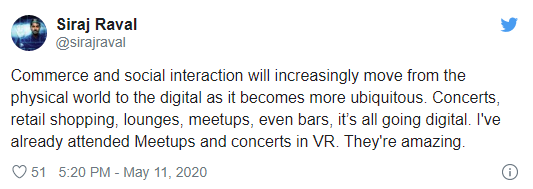
I find myself thinking about what technology trade shows might look like in the future. ServiceNow is not the only organization realizing they can spend less, and reach more people with virtual events. As I close out this prelude, I am reminded of a few recent things I have read, heard, and experienced over the last few months. Let’s start with the idea that a transition from a world where the pendulum swings significantly from physical presence and engagement to virtual presence and engagement implies a trajectory towards a “soulless” existence. All I can say is that I have been living the Q-Life (Quarantine Life) for months now, and my soul is fully intact. I also think we have to be careful to recognize the most influential movement in technology in the last ten years, known as the Open Source movement, is driven by passionate digital nomads. I think this tweet from Siraj Raval foreshadows the future well. I always say the future is not scary, it’s the shadow cast by those unwilling to move towards it that is truly scary, how about we spend less time making prognostications about the future, and just live it. Next, I thought about the conferences I have attended over the past few months, such as Knowledge, Maker Faire, DockerCon, and Slack Tour. What I have observed is the democratization of information and access and an unprecedented level of scale and reach that virtual events provide. What does this mean for the future of trade conferences? I would say thinking it doesn’t mean something significant would mean you are more interested in what was, rather than what will be, and this scares me. How cool was it to wake up on Saturday, May 23, 2020, and watch presentations from makers around the world doing everything from building ventilators to pivoting their business to respond to the public health crisis created by COVID-19. For these great human beings, I am 100% positive the measure of their soul has nothing to do with the paradigm they operate within, people with a soul always find a way to let it soar. Lastly, Dell World 2020 was postponed and moved to a virtual event to take place in October, and I found it interesting that the giveaway this year at Dell World was an Oculus Go. The intersection of what I have experienced thus far with virtual conferences, Siraj Raval’s tweet on the impact VR will have on digitization, and Dell’s Oculus Go giveaway is undoubtedly an interesting piece of happenstance.
Now that I have articulated some of my macro-level thoughts, let me talk a bit about the themes and takeaways from Knowledge 2020.
Let me start by saying that as we envision the future of digital business and understand the pivots we need to make, the more we will value building on platforms that deliver capability, agility, and velocity that will enable digital transformation. Digitization and/or Digital Transformation are no longer something businesses can think about as a planned future endeavor while continuing to plug along with the status quo. Organizations must undertake and accelerate digital transformation efforts to enable their businesses and to remain competitive. As we’ve learned over the past few months, the ability to make this journey could be the difference between survival and extinction.
ServiceNow expected 25,000 to 30,000 people in Florida for Knowledge 2020, and the shift to a virtual event enabled millions of people in 140 countries around the world to participate.
As work from anywhere has taken hold, globalization, digitization, and digital transformation are in full force across the world, and ServiceNow is providing the platform enabling users to pivot quickly. The use case referenced is Lowe’s having to onboard 323,000 employees in 96 hours; this was a requirement for Lowe’s to process leave requests as a result of COVID-19. COVID-19 was the catalyst for accelerating transformation at scale, and ServiceNow was the platform that made it possible. These stories are not unique to ServiceNow. I’ve seen organizations, large and small, leverage the power of the public cloud to address the needs of their users quickly. The ability to rapidly change how users work and to adapt, survive, and in many cases, thrive amidst a global pandemic requires the elasticity, agility, and velocity provided by XaaS (Anything-as-a-Service) offered by the public cloud.
Living in the New York City metro area I remember the situation post-hurricane Sandy, where organizations rushed to get laptops to users who could not return to the office, this was painful, and Sandy did not pose the supply chain challenges that a global pandemic has created. Following Sandy, we saw a considerable uptick in VDI (Virtual Desktop Infrastructure) initiatives. These initiatives were costly and, in many cases, the infrastructure was oversubscribed, with hedges on user concurrency driving reductions in resource sizing (e.g. – compute and bandwidth capacity). As we’ve worked through COVID-19 with organizations transitioning to a work-from-anywhere model, we have seen organizations that have been able to scale up using cloud resources like AWS Workspaces, easily adapting to a complete shift in how their user community works. With a clear business case, the public cloud cost conversations become secondary; organizations begin to see the real value in the agility, elasticity, and velocity that public cloud infrastructure provides. As a service provider, having the right platforms and tools helps us solve business problems, the public cloud measures resource lead times in seconds or minutes, not days and weeks, and when your world changes overnight, this becomes pretty important.
That market is demanding consumer-grade experiences and happy users. Enterprises who can’t or won’t provide consumer-grade experiences will struggle to hire and retain the talent they will need to be competitive in a world that will embrace a work-from-anywhere culture.
Digital Transformation is no longer a nice to have. Organizations that are already digitally transformed are capturing market share amidst a very difficult social and economic climate. The value chain is transforming, and organizations need to retool to deliver a consumer-grade user experience in the enterprise.
Great workflows drive great user experiences. Seven trillion dollars will be invested in digital transformation between now and 2024. Organizations have made big investments in systems of record, but consumer-grade experiences are about action, integration, and velocity. Execution requires seamlessly connecting people, process and technology in a frictionless way, and ServiceNow is the platform of platforms that enables integration and delivers an increase in speed, productivity, and innovation.
ServiceNow continues to focus on consumer-grade experiences, and these experiences underpin the idea that ServiceNow makes work, work better for people. Underpinning these consumer-grade experiences is an investment in mobile-enabled, smart experiences leveraging machine learning and technologies like NLP (Natural Language Processing) that enable the platform to make smart decisions and deliver great consumer-grade experiences.
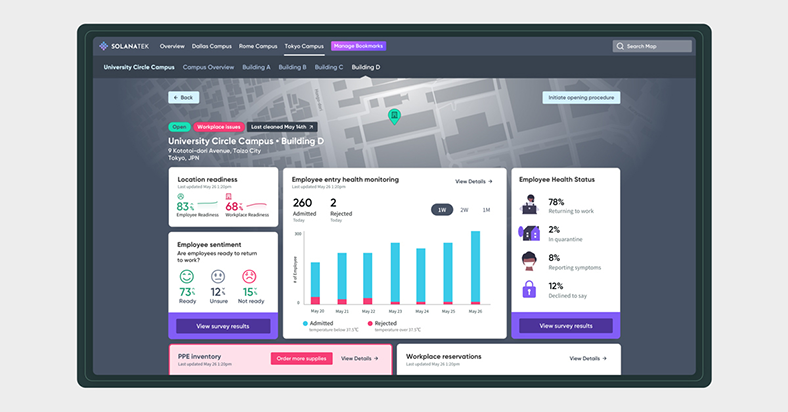
Workplace and workforce health concerns are at the forefront. I’ve personally been working with ServiceNow Workplace Health applications, partnering with screening device developers that leverage computer vision and artificial intelligence to surveil public spaces and the workplace. Over the past month, I’ve worked to integrate public space and workplace surveillance systems with ServiceNow Workplace Health applications to deliver automated, real-time KPIs, and dashboards. This integration delivers AI that can approve an employee’s entry into a facility if they pass PPE (Personal Protective Equipment) and temperature checks while denying entry to those who don’t. Integration with ServiceNow allows users to escalate for human review and intervention while tracking all the KPIs required for an organization to make informed decisions.
To prototype this integration, I’ve built an MVP (Minimum Viable Production) to make API based requests programmatically. This MVP is enough for our screening device partners to understand how they would construct a REST API call from an edge screening device to ServiceNow. The best way to understand this concept is to check it out the MVP here: https://repl.it/join/fpwhmote-rbocchinfuso
ServiceNow continues to innovate, focusing on some key areas:
Operations resiliency, including workforce optimization and order process optimization.
Smart experiences, including mobility, machine learning, portal, agent workspaces
Spend optimization; this is all about creating the single pane of glass from which users can view and optimize software, hardware, and public cloud spend by identifying and reducing waste and running lean.
Core platform innovations, in the areas of integrations, CMDB, performance, and upgrades to deliver a great customer experience.
In the area of customer service there is a big focus on culture and community (and I’ll say transparency as well), breaking down silos, and connecting the value chain by connecting all the people inside the company to all the people you want to service outside the company. The paradigm is shifting rapidly, and adaptation will depend greatly on organizational culture and systems’ ability to create pleasurable, frictionless, consumer-grade user experiences. This pivot is about more than IT, InfoSec, and corporate reputation; it’s about people; it’s about the ability to attract, hire, retain, protect, and cultivate people. This pivot will require the consumer-grade experience that the work-from-anywhere knowledge worker will demand.
By building a great customer (internal and external) service platform, where friction-free self-service becomes the norm, where virtual agents provide effective solutions, we are building an environment where human interaction in service issues becomes the exception, and talented people are free to innovate.
“The workflow revolution has only just begun, and ServiceNow will be the catalyst to redefine the enterprise, not as it is today. But as it must be tomorrow. There’s no way we can live with the cycle times of innovation that are going on with systems that are too slow, too antiquated to achieve what we all want. We all want great experiences for our teammates and for our customers. And we have to remember that behind every one of those great experiences is a great workflow.” – Bill McDermott, CEO, ServiceNow
Hopefully, everyone is staying safe and healthy. Quarantine has allowed me the time to gain clarity of some of the thoughts that crowd my head, to work on improving how I organize these thoughts and drive towards zero loss, and this has made creative writing even easier. This idea is one that hit me a couple of weeks ago and as the last few weeks have gone by the content and ideas just kept coming. I am going to set the tone for this quarantorial with the title of this post, the phrase “Act As If” from the movie “Boiler Room“. Hopefully, you have seen this movie, if not take advantage of quarantine to watch this film.
Ben Affleck in a legendary scene from Boiler Room(Warning: Scene contains strong language.)
Before I go any further, let me quickly say that this is written from my perspective and within my own personal context. This article would be far longer and far more complex if I was exploring a broader circumstance and perspective, that I am fully aware exist. I have no idea how my circumstance, opportunities, and choices line up with the broader view and I don’t have time for the research, thus I am qualifying what I write with, there will be some who agree and some who don’t agree, you’re free to read my opinion or not, your greatest gift is free will, maybe. 🙂 The exploration of the paradox of choice will remain for another day.
It is my sincere hope that we all recognize that people like Jordan Belfort, Bernie Madoff, Barry Minkow, and Bernard Ebers all relied on Acting As If. A belief that if you want to be successful you need to look successful, drafting behind the suit, the watch, the cars, and the homes that say you are a success, allowing them to associate with the type of people they need to associate with to be successful often by exploiting weaknesses in humanity and socioeconomic circles. There is a very fine line between a positive mental attitude and acting as if, I think we can all see this line on display during the daily White House briefings. Humanity has a natural predator that relies on the creation of a context that creates a safe place to make and justify decisions based on the illogical, like the idea that someone has a system to consistently outperform the stock market, and never lose. I am not going to digress here, but there is an interesting parallel with political rhetoric, and making people feel safe to make illogical decisions.
I like the phrase “Act As If”, but I hate it in the context of “Act As If” you’re somewhere or someone you are not, I am nauseated by the idea of growing into yourself, or acting like who you desire to be. I like it (maybe even love it) in the context of “Act As If” tomorrow everything will change. “Act As If” tomorrow everything you know to be, believe to be, and have to come to rely on will cease to exist. I am not saying be a doomsday prepper, what I am saying is to mentally condition yourself to be adaptable, to survive and flourish amid radical change. Realizing that everything can change, makes us realize that life is about who we are, not who we want to be, that the macro norm is and always will be SNAFU, at least as long as humans are involved, I can’t speak for elevated life forms. COVID-19 while something out of a science fiction story is showing us that logic and reason should always prevail, that whether you believe in a higher power or not the biggest gift that each of us has been given is free will (maybe) and the ability to apply logic and reason to our decision making. Some would argue that there is no such thing as free will, and I might philosophically agree given that we are not always free to make choices, but this doesn’t mean we are never free to make choices. DO NOT DRINK OR INJECT DETERGENTS, ALSO DO NOT EXPOSE YOURSELF TO UV LIGHT! What depresses me is not quarantine, it’s ideas like how I dress, where I live, what car I drive might actually have an influence on societal status and progression, this is very sad in a time where we are supposed to be evolving as a species. I’d rather be judged on my capability, not my haberdashery, but somehow some guy just like you and me says drink detergent and it’s newsworthy because people might actually do it. So I ask myself should I be surprised by the lack of depth our society often possesses? The answer is clearly, NO. Our unconscious biases run deep, but I think that a bad situation may actually be unconsciously helping us to attack unconscious bias, more clarity on this as this quarantorial progresses.
I was raised Catholic, not to get non-secular here, but I believe in a higher power, haven’t met this person or thing so I don’t know what it is, I don’t buy into imagery, and I don’t believe other human beings living on the same planet can be elevated above my place on this planet by ordination. I believe these things because I was taught during my thirteen-year Catholic education, apparently, I am built in God’s image and likeness. Well if I believe this, then God gave me the ability to apply logic and reason, and so much of this is not logical or reasonable. To stay connected during quarantine our team has been conducting nightly 1:1 interview sessions, and when I was being interviewed I was asked, (paraphrased) “assuming there is an after-life, what would you say when you arrive at entry point?” I gave an answer, but upon further thought, I think I would simply say, as the creator you gave me the ability to make all the decisions that I made, and now you want to judge me, that is pretty eff’d up.
Over the past six weeks or so, I have had a lot of time to read, write and reflect, and there are somethings, as a direct result of COVID and the quarantine that have been awesome revelations for me. My creative juices are definitely flowing, while I can’t sing or play an instrument, I can come up with ideas in my swimlane and opine on my vision, and I am thankful for that.
First off, I feel like quarantine has made me a better dad, my schedule without the need to commute or travel often for no great reason, without the expectations or perspectives of others at different points in their lives or careers has allowed me to find time to focus on productivity. My contributions feel far less routine and far more meaningful. My waste has dramatically decreased and I was already lean, but more importantly, my frustration with things outside my control has decreased and this has increased my patience and satisfaction. There is no doubt that good parenting and patience are directly related, so I’ll be taking this realization away with me post-COVID. I should also note that I work just as long, and just as hard, with far less waste and a much better ability to interleave my time between work and family, the reasons for this are pretty straight forward. My routine is the same, so I’ve added hours per day of time to my workday every day because I removed the routine, this is time I can be creative, I can learn, I can read, I can write. Family time is simpler, it’s less hectic, the paradox of choice in many cases has been lifted, life is just simpler, and everyone is arguably happier with this simpler lifestyle. I feel zero stress about not being able to go to a restaurant, about not being able to go to the supermarket, what I feel is the freedom to focus on a finite set of simplistic daily life requirements. Like Tony Robins’ says “Complexity is the enemy of execution.” My execution is better because life is simpler.
I do want to quantify this by saying that choice is something I have, something I am incredibly appreciative of and this is not something everyone or even most have. What I will say is I never stop working, I never unplug, I never stop thinking, I am trapped in a 24x7x365 world where ideas waiting for me to act on them and competing priorities creates endless anxiety. We all make tradeoffs, and not everything is what it seems. My father worked 17 hour days regularly (including commute time), but when he was home his mind was free, my mind never seems free. This is who I am, I love this person, I value my active mind, I love the opportunity to think and experiment and I would never want to change myself, but when choices are reduced life gets simpler. Some people love the Cheesecake Factory menu, other people feel exhausted by it, endless choice, with no actual control.
There is nothing I can do in a physical room that I can’t do via a video conference. I am a knowledge worker, working in technology in a highly connected world, my productivity has been greatly increased by sheltering/working in place. We’re all on an even playing field now, and capability matters, this is the world I want to live in, minus a deadly virus. Where I live, what I wear, how I look, how I smell, and what I drive have zero influence on achievement. These are now my choices without the definition of what’s “normal”. There are no lunches, no dinners, no happy hours, and no golf outings so our relationships are predicated on factors like the quality of our broadband connection, our ability to stay engaged and productive working autonomously, our efficiency, and our ability to grow and flourish in a time when much of what we do will be self-directed. What matters now is the only thing that matters to me, our heart, and our brain, arguably in their purest form. Unconscious bias is harder to come by right now, and I think this makes some people unconsciously uncomfortable. I’ll admit I have a bias against people who want to approach me to chat. If you’re talking to me and I can hear you and were not on the phone or a video conference, YOU ARE TOO CLOSE, I don’t care that you have a mask on.
I do hear the argument that “you need to be in a room to read people”, OK, maybe, but I am not a psychic, psychologist, profiler or some other professional who should have faith in their own ability “read people” nor do I think it changes the outcome. I am who I am, some people will like me, some people will not and that is OK, but I work incredibly hard on my abilities and I do it for me, I have no relative measures of success, I covet nothing, I have incredibly basic needs outside of an insatiable thirst for knowledge and in today’s world, I am more likely to be judged on the merits of who I am than on the context in which I exist. More so than ever, our reputation and influence are directly linked to our ability to execute, and like this.
Before I move on I want to touch on the idea that not only are we flattening the curve, but a post-COVID world will be a flatter world, a world where the geographic location of the knowledge worker will become far less relevant and the Digital Nomad will become far more prevalent. Every transformation requires a catalyst, and while we have been waging this debate over nomad vs. office culture for years, the field of play has forever been changed. Today we are connected by a wire, and our digital existence knows no borders, the catalysts for a return to “normal” that existed following the 1918 flu pandemic simply no longer exist in many areas of the knowledge economy.
Today I feel a far greater responsibility to engage and to connect with others and I am not exhausted by the routine of doing so. When I engage I am fully engaged, and I enjoy it. Part of the reason I think I am enjoying social engagement in a virtual world is that it seems purposeful. Each night at 5 PM EDT my team jumps on a call, on Monday, Tuesday, Thursday and Friday we do 1:1 interviews that last approximately thirty minutes, I have learned so much more about everyone who has been through the process, and arguably more than I could have ever learned in the same time period showing up and sitting in the same room all day. On Wednesday we hold “Wired Wednesday”, this session runs a couple of hours, and each team member brings tech (life) mentor/influencer in the form of a video conference background and talks for three to five minutes on how this person influenced their life and career in tech. Each person on this team has touched my heart with the way they have presented, and I am sure they have touched the hearts of their peers in the same way. These are great people, with great stories that I have gotten to know at a much deeper level and I’ve had fun doing it. I record all the session and I rewatch them at night with my wife and kids, my family now knows everyone who I go to work with every day, I get to tell my kids how lucky I am, I get to leverage the great women in technology on my team as tangible role models for my daughters. I have spent 28 years as a professional, working day in and day out with many of the same people for years and years and I never came close to the connection like the connection I have created in the last six weeks. Social distancing has created connections that otherwise would never have been created.
Like productivity, socialization is in your head, it’s not where you are, it’s who you are and what you do. We live in a time where we don’t want to define anything, I am cool with that, but let’s not define this as the “new normal” and just define it as today, and realize that today can be better than yesterday or it can be worse than yesterday, the choice is ours. This is not some pollyanna bullshit, our opportunities are endless, learn to love something new, explore something you would never have explored if you could choose to do something else, you just might find that edX Justice course is something you can’t stop watching. Don’t judge our situation as good or bad, don’t get wrapped up in what yesterday was like, and just find the beauty and opportunity in today, it’s there you just need to find it and figure out where you personal win lives.
I will finish with productivity. I couldn’t be happier with the professionals who I get to come to work with, go to war with, and call friends every day. We set out years ago with strong headwinds to build a business that was sustainable, that I/we felt could operate in a paradigm that I/we felt was coming. This pivot pushed us to an autonomous work from anywhere model, where we focused on hiring people with a passion for what we were doing and what we were building. Today what was a team in the low single digits has become a thirty person team, with a business that values partnership and doing the right thing, and I credit the culture, passion, and commitment of this team with the fact that our business is continuing to grow during an economic tsunami. Slow and steady has always been the approach; empower others, provide autonomy, and provide them the freedom to fail. My ask in return is that we all possess an unparalleled level of passion, commitment, accountability, and responsibility.
We are embarking on the “new normal”, but really it’s just another day living a life where the only thing we have a modest level of control over is ourselves, so Act As If today, tomorrow and the next day are just days, constrained by the circumstances of life.
OK, so I know that I referenced this post in my “Volume 1: Musings on community, evolving market dynamics, the human spirit, and ingenuity” quarantorial; part of the reason I wanted to write about this was to take a look at the knowledge economy in the context of COVID-19, quarantine, social distancing, and stay-at-home. One of the key aspects that I think has come to light as a result of COVID-19 is the difference between being motivated and productive vs. “being there”, for years I have believed, evangelized and argued that success is derived from motivation, drive, mastery, passion, purpose, and autonomy, because “being there” is just a state of existence. I can’t tell you how many times I’ve observed people sitting at their desks surfing social media and texting, with a seeming total inability to focus, what I would call “being there”. Those merely existing want us to exist alongside them, but those of us who have elevated, those of us who spend 24x7x365 preoccupied with problem-solving, those of us who can’t wait to get up to start tackling the idea that came to us at 3 AM feel incredibly confined and distracted in this rigid, monotonous and unfocused operating model. It’s not solitude that suffocates us, it’s conforming to a model that we know retards our progression. In the words of the great Gen Xer, Tony Hawk, “I am driven by progression”, and with finite time available I have no time or tolerance for distractions.
I can’t stand the debate of ‘do you live to work or work to live’, because this is a self-fulfilling prophecy; spending time looking for balance is time spent looking for mediocrity. If you live for (love) your work, it probably doesn’t feel like work and your life is probably much more fulfilled, Jeff Bezos calls this work-life ‘harmony’ rather than work-life ‘balance’. If you spend time thinking about working to live, chances are you probably don’t love what you do and are not fully immersed, thus you can never elevate to a place that fulfills one of my favorite quotes “Your profession is not what brings home your weekly paycheck, your profession is what you’re put here on earth to do, with such passion and such intensity that it becomes spiritual in calling.” – Vincent Van Gogh
Steve Jobs said in his famous Stanford commencement speech “The only way to be truly satisfied is to do what you believe is great work, and the only way to do great work is to love what you do. If you haven’t found it yet, keep looking, and don’t settle. As with all matters of the heart, you’ll know when you find it. And like any great relationship, it just gets better and better as the years roll on. So keep looking, don’t settle.” There may be no better interview question than; do you believe this sentiment, and how will this job deliver satisfaction, how will it enable you to do great work?
Many of the ideas I will explore in this quarantorial are concepts I have been pondering and rooted in for years; so much of the content is content I have thought and written about for years put into the context of COVID-19 and a post-COVID world. I am intrigued by how so many people believe that muscle memory is 90% of the battle, how so many people need a catalyst like COVID-19 to wake them up, how fast they are willing to question and alter that which they were so “committed” to yesterday. Don’t get me wrong, muscle memory is important with many tasks, but when it comes to knowledge work it’s all about how you perform when muscle memory doesn’t exist; when there is no program for success; when there is no relative measure of success. Can you invent a way to do it, can you find new muscles and make them burn, can you stay motivated and driven, can you find satisfaction in your own progression?
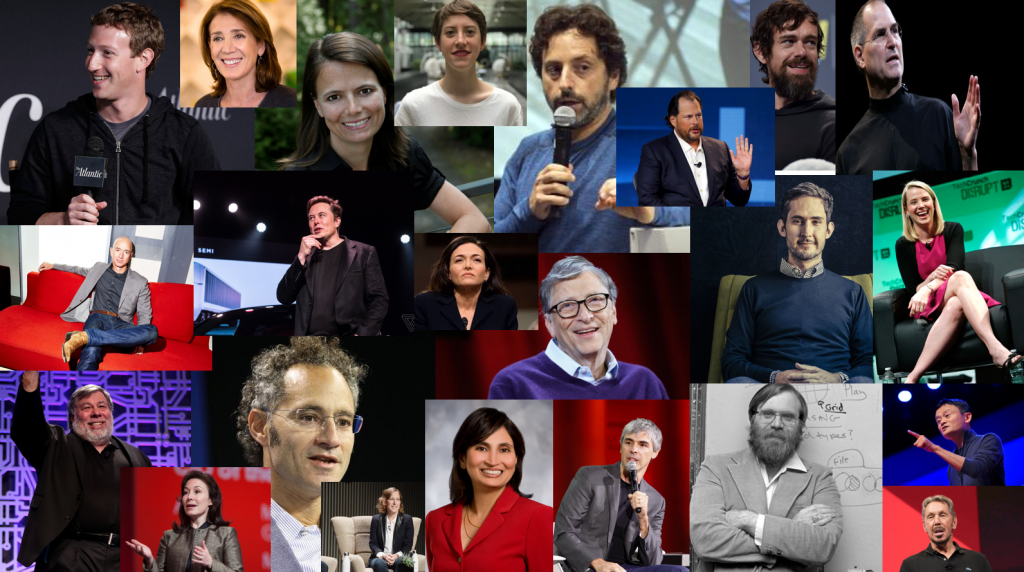
Take a minute and think about the leaders in our modern knowledge economy. Do you think they rely on muscle memory, or on thinking differently? Do you think they rely on routine, or on a willingness to fail and a desire to blaze the trail, with no sacred cows and the ability to objectively and subjectively evaluate and pivot quickly? Do you think they think about work-life balance, or do you think they personify Van Gogh’s “Your profession is not what brings home your weekly paycheck, your profession is what you’re put here on earth to do, with such passion and such intensity that it becomes spiritual in calling.”
Titans of the modern knowledge economy.
Hopefully, it’s obvious I think about these ideas nearly every day, but before I start to explore some of this in the context of COVID-19, I want to talk about what I will call a work-from-anywhere or knowledge economy fitness tips. First off, the most important fitness routine for any knowledge worker is to exercise consumption, learn how to consume and comprehend as much data and information as possible, exercise all the consumption senses, reading, listening, and watching; these are the senses that fuel original thought. Second, write, and write a lot, we only get good with practice and in solitude, writing is how we hone expression, it’s how we develop our thoughts, it’s how we develop our vocabulary and becoming a better writer makes us a better communicator. Practice storytelling; tell stories to the completely disinterested, learn to read the audience, keep trying, and work until you can hold their interest, you’ll know when you are making progress. Lastly, and arguably one of the most important life hacks that I learned after having children is how to interval work on complex tasks with near-zero loss. Let me explain; before I had children I required total immersion in a task, I had to work to completion, 8 hours, 15 hours, 48 hours it didn’t matter, start the task and work on it until completed. This was not a bad thing, but it’s not sustainable and I was also easily disrupted. When I lost focus, our just stopped for the day from pure exhaustion, restarting the activity took significant effort, there was an immense energy and time loss associated with stopping and starting. Children forced me to train my brain and my personal process to achieve minimal loss when stopping and starting complex tasks, this has by far been the hardest and most impactful productivity hack I have achieved over the last fifteen years.
Physical Fitness
Physical fitness is important, but the knowledge worker will never need to run a marathon, this like a running-back working out with the goal of kicking a 60-yard field goal, the time spent working out with the goal of kicking a 60-yard field goal is time that should be spent conditioning for the running back position. I am not saying be unhealthy, what I am saying is any goal takes focus, the more extreme the goal the more focus, and the question that is raised by training for a marathon is where does your passion lie. FOCUS, FOCUS, FOCUS, there are finite hours in the day, FOCUS is required. Balance breeds well-rounded mediocrity, and for the modern knowledge worker FOCUS is more critical than ever. So let’s talk about knowledge worker fitness.
Hack your life.
Stay fit, but remember unless your trying to be Tony Hawk the backside 720 is not something you should be investing hours and hours a day into perfecting, this is defocusing you. If you find yourself unable to stop, pivot your life to look more like Alex Honnold’s life, throw the computer out the window, get a van and focus.
Understand “The Buzz vs The Bulge” so you can stay reasonably fit and focus your time where you get the greatest yield.
Figure out where your mind goes and why; stop wandering. How can you achieve flow? No matter what guide you look at, “choose work you love” will always be at the top of the list.
“Flow is the state in which people are so involved in an activity that nothing else seems to matter; the experience itself is so enjoyable that people will do it even at great cost, for the sheer sake of doing it.” – Mihaly Csikszentmihalyi
Write down 100% of your ideas and thoughts, no matter what time they come to you, wake up and write them down. I have a Trello board just for ideas and thoughts; if I think it, I write it down. That time spent thinking about something you know you already thought about, but can’t recall is an immense waste of time and brainpower.
Get the proper knowledge-worker physical fitness equipment.
Finger and hand dexterity is very important for the knowledge worker, we will be turning a lot of pages, writing and typing hundreds of thousands of words, and stong and limber hands and fingers will serve us well. The rubber squeeze ball is ideal for maintaining hand and finger strength as well as releasing stress.
Grip and forearm strength are critical, that mouse isn’t going to move itself and the stronger our grip and forearm the less likely we are to develop carpel tunnel syndrome, a potentially limiting affliction for the modern knowledge worker.
As we age, wrist and forearm strength become harder to maintain. The weakening of these critical knowledge worker muscles can contribute to carpal tunnel, joint pain, and even arthritis. A good wrist strengthener can keep you operating at peak levels.
Just about every knowledge worker possesses the most powerful tool available, a smartphone. This is your key to mental fitness, stay off TMZ, and focus on working out at all available times. On the train, read while standing, get a good text-to-speech engine for PDFs and consume those long white papers while in the car (I use eReader Prestigio, but there are many options), get a good voice recorder app (I use Easy Voice, again there is no shortage of options), get a good speech-to-text app (I love Otter), get yourself a good academic mobile learning platform like Coursera, edX, or Udacity and continue educating yourself. Invest in a good professional training platform like Pluralsight. Get a good on the go coding learning platform to stay sharp, platforms like SoloLearn, Programming Hub, Encode, DataCamp, and Codeacademy are some of my favorites. I am an Android person and for years I have been using TubeMate to pull down keynotes, and other video content from YouTube for offline viewing, I am sure there are tools for the iPhone, get one and use it. Lastly, get yourself a good podcast tool, and commit to podcasts, remember a good podcast app moves with you, the experience between mobile, desktop, laptop, and tablet should be seamless and in-sync, so you can consume content efficiently from wherever. The podcast app that I have used for years is Pocket Casts.
OK, let’s explore some of the ways to improve our game beyond the mobile device because a mobile device approach only gets you so far.
Invest in some sort of casting device. Chromecast, AppleTV, Roku, etc… When you are on the sofa or spending time with the family you want to encourage yourself to watch a Coursera, edX, Udacity, etc. lesson. You would be surprised how you can align multiple aspects of your life if you create the proper environment. My entire family has watched some aspect of Justice and talked about the moral and ethical dilemmas posed by Professor Sandel and CS50; Professors Malan’s use of the PB&J to introduce logic and structured design is epic.
Commit to a cloud-first strategy. Make every experience portable and consistent.
Prepare for offline access and make use of that offline and inflight time. For me, this means having my Chromebook or Android tablet ready with Termux or Crostini, Android apps like Pydroid and LovelyDocs, and of course the Kindle app to name a few.
There are so many other tools that I use based on my use case, but above I listed some of the more ubiquitous tools that I touch on a regular basis.
Get yourself the right tools and make them available, remove access roadblocks, and lame excuses.
A cloud-first strategy lets you have N devices and keep them in sync no matter where you are.
Kindles and tablets are cheap, place them around the house strategically. Have one in your backpack, one in the family room, one on the nightstand, don’t move them. When you’re in bed and the Kindle or tablet is in your backpack, you’ll make excuses, don’t give yourself an out.
One computer is not enough. To maximize 100% of your available time you will need computer placement similar to Kindle and tablet placement. I say invest in a few Chromebooks because these are low-cost devices that force adoption of a cloud-first strategy, they have great battery life and they are full-featured, you can read, you can study, you can code, etc… There is no shortage of Chromebooks to choose from, my current daily drivers are an ASUS C302 and an ASUS Chromebook C523NA, which I bought from Amazon Warehouse for $189, the big screen helps my aging eyes. For those who want a good reasonably priced Chromebook that attacks various use cases, but won’t break the bank, I suggest looking at the Acer Chromebook R 11 Convertible.
You may be thinking I live in a small apartment, why do I need more than one computer. The answer is simple when you come home from work, that computer is in your bag, like anything in life, just that act of taking the computer out of your bag and powering it on can be the difference between an 10 or 15 minutes of time on the computer that is sitting on your nightstand and just going to bed. Add that time up over time and it’s a difference-maker.
Get hands-on experience and don’t spend time on trying to figure out how to stand-up infrastructure, this is like looking to become a surgeon, but learning how to be a plumber first so you can scrub in. Leverage platforms like Katacoda and Codeanywhere to get your hands on the keyboard and start using those physical muscles you worked so hard to condition. As you progress leverage the public cloud as you need more complex infrastructure and compute power. A word of advice, API first, meaning don’t build that which is sitting there waiting to be consumed via API.
Don’t build a Linux server at home when you can get a VPS instance from somewhere between $3 and $15 per month, depending on what you are looking to do. OVH VPS and AWS Lightsail are great options here.
Don’t build a logging server when you can leverage something like LogDNA for free or for $3 a month.
Follow the rule of staying focused on the objective. Most of us eat to live, but we don’t farm because there is an easier consumption model for us to meet our objective of sustaining ourselves, it’s called the grocery store. If the grocery store ceased to exist, we would all have to become farmers, but not having to farm allows us the time to focus elsewhere.
Facebook, Instagram, Snapchat, TikTok, etc… are all time wasters, uninstalling something like Facebook probably not realistic, just stop using it unless your mom says did you see my post, just say no and then take a look.
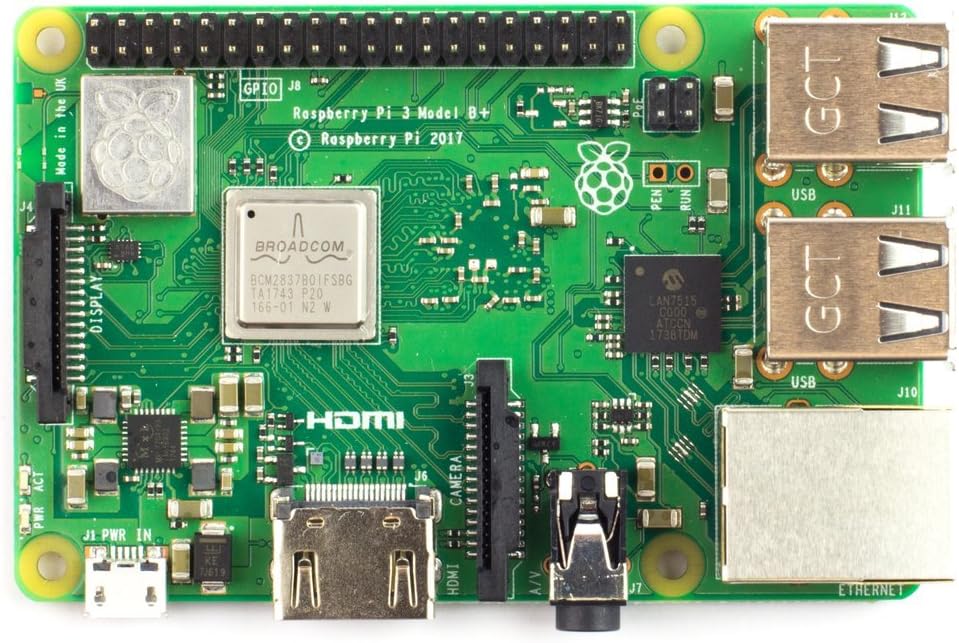
You’re craving that hands-on hardware experience? You don’t need space, power or cooling. All you need are a few Raspberry Pi 4s. There are lots of ways to accomplish building your Raspberry Pi cluster. I suggest the following parts list (or comparable):
While the cost of the above is not outrageous given what you will have in a small form-factor compute power, with low power requirements, you may be able to lower the cost even further using a single Raspberry Pi 4 and a Cluster Hat.
Raspberry Pi 4 with Cluster Hat and 4 x Raspberry Pi Zeros
Also, once you get your RPi cluster built, you will love K3s!
Focus and Yield
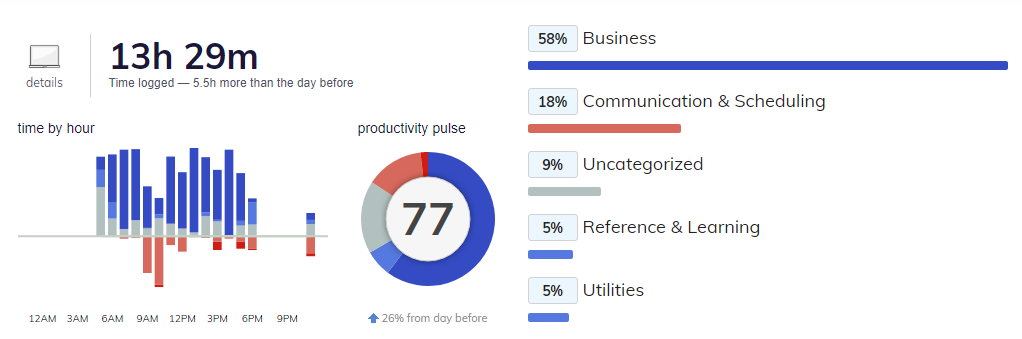
Invest in the proper tooling to track and metric how you spend your time, pay attention to the data and make changes to increase your productivity. Know your regiment, aka where muscle memory matters, for example, I read for one hour and write for one hour every morning, this time is off the grid, but it is part of the regiment that I am committed to because I know is subjectively additive to my time on the grid. Be Jerry Rice deliberate about being the best at your position; progression is not a relative measure.
RescueTimeEvery day is different. When we don’t accomplish our goals, it becomes important to have the data that provides us with a retrospective. When we do accomplish our goals, the data can helps us understand why we were so productive. Setup may take some time, but to get a good view data collection needs to be passive and consistent on all platforms, mobile, tablet, laptop, and desktop.
Listen and observe, but make your own logical decisions, those relying on routine rather than passion and motivation like company.
COVID-19 as a catalyst for a biger change.
I am seeing people who I’ve known to have convicted opinions about the “what is required” change how they think. The pivot is happening quickly, #StayAtHome has forced a change that many individuals would not make on their own and operational changes that organizations would not have taken on their own because of perceived risk, but here we are, the bandaid has been ripped off and were making some astonishing discoveries, we realizing that the motivated perform and the unmotivated show up and take up space, doing harm and masking the long-term prognosis and impact.
I am sharing a video entitled “RSA ANIMATE: Drive: The surprising truth about what motivates us” because this whiteboard does a great job distilling the Daniel Pink’s book Drive. If you have not seen the video or read the book, I recommend taking the time to do so. While there is this age-old adage that salespeople (and plenty of other people) are “coin-operated,” I think it’s important to recognize that this motivation is not likely the motivator that underpins many of the cultures that make up the new knowledge economy. BTW, don’t let yourself off the hook with obvious motivators like family or a desire to win; we all want to take care of our families, and we all want to win.
Everyone has different motivators; I love motivational theory because, as a leader, I believe understanding motivation theory is my best chance to gain some understanding of the most complex and impactful variable I can comprehend, the human being.
I am a Herzberg’s Two-Factor Theory person; for me, I am very interested in satisfaction vs dissatisfaction which is why I gravitate towards Herzberg. I have spent plenty of time discussing McClelland’s Need Theory and Maslow’s Hierarchy of Needs with others who favor these theories. Some of the more interesting conversations I’ve had are about why people favor a specific motivational theory.
I hope everyone is staying safe, staying healthy, thinking deeply and stepping up their focus game.
Those who know me, certainly those on my team, know there is nothing I enjoy more than opinion piece delivered using the lost art of the written word. Some of these people like to call me verbose, but I think we all know that “we mock, what we don’t understand.” – Dan Ackroyd – Spies Like Us
Today I thought I would publish my first in a series of quarantorials, sharing some of my thoughts on community, evolving market dynamics, the human spirit, and human ingenuity, as well as some reading, and film suggestions along the way. This was prompted by a co-worker who delivered some great content to the community and also took the time time to provide idea attribution.
First, let me start by saying that all of my ideas are in the public domain, licensed using the Creative Commons license, and I intended for them to be borrowed, improved, and reshared. Recently a co-worker referred to themself as a “thief” (in jest of course), but this got me thinking, this person is not a thief but rather a good community actor, providing attribution and not violating the Creative Commons license. 🙂 The most important thing about leveraging that which is governed by Open Source licenses like the Creative Commons or the GNU Public License (GPL) is not only that we provide attribution, but that we improve the idea and contribute our improvements back to the community. To this individual, I say, thank you for leveraging the idea, thank you for the attribution, and thank you for contributing something back to the community in the form of quality content and a well-articulated message. Most importantly, the backdrop landscape in their video, what can I say other than I may use it as the backdrop for a future video on socialism and the benefits of the aristocracy. 🙂
It’s easy to get caught up in our rhetoric, to think that value creation is rooted in the proprietary, something only “I” or “we” can do, aka the secret sauce. The reality is there is no secret sauce; there are “no more secrets”. – Robert Redford, Sneakers
Free and frictionless access to information is an incredible change that has been brewing over the last three decades and reshaping our industry in recent years. While novel ideas remain, the life span of these ideas is so short that it’s almost immeasurable. These changes are hard to accept because they mean that we need to work harder (smarter) tomorrow than we did yesterday. As human beings, this may not be our desire, it may seem counterintuitive, it may seem hard to comprehend, but look around, it’s not perception, it’s reality. The shadow chasing me is the shadow of a future which is growing and moving faster than me; the shadow is my visual reminder to work harder, work smarter, and run faster. Some of you will have the context to understand the shadow reference fully, and some will not, that’s OK. 🙂 Community contribution, community reputation, and achieved authority are replacing proprietary protections and ascribed authority; this has been happening in tech for a very long time. COVID-19, while not pleasant, is demonstrating that human ingenuity and the community offer far more than the proprietary protections of a closed-source world. Commercial corporations like Medtronic have open-sourced plans for their PB560 ventilator, research institutions like MIT are developing a low-cost open-source ventilator, and DIYers like Johnny Lee have converted their CPAP into a ventilator and open-sourced the plans. There is no doubt that COVID-19 will be a catalyst for change. The ventilator industry will look different, who knows what the travel and hospitality industry will look like, this list goes on and on. One day Zoom is the leader of the pack, the next day, I am on a Zoom call and the customer says “we’ve been told to not use Zoom”, things can change that fast. Business models will cease to exist, and new business models will emerge.
For some perspective on remote knowledge workers, consider that 96.3 percent of the top 1 million web servers run Linux, and Linux is free. One guy in his basement in Finland leads over 15,000 worldwide Linux kernel developers working from just about anywhere (probably not a traditional office), to build a free operating system that is moving towards 100% market share. What motivates these people? Stay tuned, I plan to explore this question in an upcoming quarantorial entitled “21st-century knowledge workers, motivational theory and working from wherever.” The level at which Linux dominates was unfathomable in the 1990s, seemingly unrealistic in the 2000s, and not fully realized in the 2010s. 2020 begins a new decade, where systems choosing to favor stability over progress continue to run code written sixty years ago, these systems are unable to process unemployment claims and during a global pandemic, the public sector is calling on volunteer COBOL programmers to remedy the issues. Stanley Kubrick couldn’t make this stuff up. I believe we will experience an unprecedented level of agility and velocity in terms of innovation and disruption. We live in a time where the U.S. Postal Service creed of “Neither snow nor rain nor heat nor gloom of night stays these couriers from the swift completion of their appointed rounds,” could very well be modified to read “Neither snow nor rain nor heat nor gloom of night stays these couriers from the swift completion of their Amazon same-day deliveries.” See “What If Jeff Bezos Tries to Acquire the Struggling U.S. Postal Service?“
Many of us who grew up hooked on Star Trek did so because Star Trek was a theatrical depiction of a futurist view of tomorrow; after all, this is what science fiction is, fiction based in science. It’s interesting that today Gen Xers are getting some love during the COVID-19 pandemic, I don’ think that my generation’s love of Sci-Fi and our mental state during a pandemic is happenstance, Sci-Fi is a context that made our conditioning possible. As a Gen Xer, for myself and my friends, Sci-Fi provided a vision and an escape into a world beyond the solitary confines of Pong and The Pet Rock. This was a time where parenting focused heavily on instilling skills like “how to occupy yourself”, “how to be seen and not heard from”, “how to speak only when spoken to”, “how work would never kill you”, “how to independently get yourself to and from activities”, “how there is no such thing as a mistake”, “how to eat when food is served because the kitchen has posted operating hours”, “how minimalism creates focus by removing choice”, “how to decide to be in or out of the house, because in and out is not allowed”. This was a time when we played popular games with our parents like “who can be quiet the longest” and “Dee’s Diner”, my mom’s name is Dolores (aka Dee) and for those unfamiliar with the game of “Dee’s Diner”, it’s where we sat down for breakfast, mom served some oatmeal (aka fed us breakfast) while we pretended to be on the set of Alice.
There is no doubt, I and many of my fellow Gen Xers were built for this shit!
Today we live in a world where Sci-Fi has seemingly been replaced with reality television, where we have to designate programming as “reality” or “scripted’ because apparently we can no longer tell the difference. The lines between reality and science fiction certainly aren’t as clear as they used to be, maybe this is because we are living in the future, maybe it’s because our infatuation with other peoples reality has stunted our imaginations. Personally, I am waiting for Peter Wayland to appear at a Coronavirus briefing to talk about building a better post-COVID world.
As I sit here decades after developing my imagination and learning how to occupy myself, I and many of my fellow Gen Xers owe our parents a big thank you, because our imaginations are intact amidst a reality attack and our mental health is at peak fitness.
I awake every day, motivated to disrupt myself, thinking about how I can better prepare for disruption. During the normal course of life, I am labeled as someone who is planning for something that will likely not happen, but the best way to delay and weather inevitable disruption is to accept that it can and will happen; not knowing when is what keeps us alert and sharp. Like Jeff Bezos has said, “One day, Amazon will fail but our job is to delay it as long as possible.”
I hope this quarantorial was an enjoyable read. Be on the lookout for two other quarantorials currently in the editorial review phase. I hope to publish them soon:
Quarantorial Volume 2: 21st-century knowledge workers, motivational theory and working from wherever.
Quarantorial Volume 3: Homeschooling observations and education reform.
Completed this project on Saturday, March 28th, 2020 but it took my spare time this week to write the README.md for the project and this blog. This post tells the story of one example of how I am making productive use of my time sheltering-in-place; how I am leveraging the time to tackle todo tasks, how I am leveraging the time to educate, how I am leveraging the time to spend quality family time and how I am doing it with passion and excitement.
Note: Be sure to scroll down to see my live basement air quality index stream.
While I am social distancing and sheltering-in-place, I am taking the opportunity to tackle some of the questions of inquiring minds. One such question comes from my wife: “Is the air quality in the basement safe?”
This weekend Eden (my daughter) and I tackled researching air quality metrics, and then we build our very own air quality monitor.
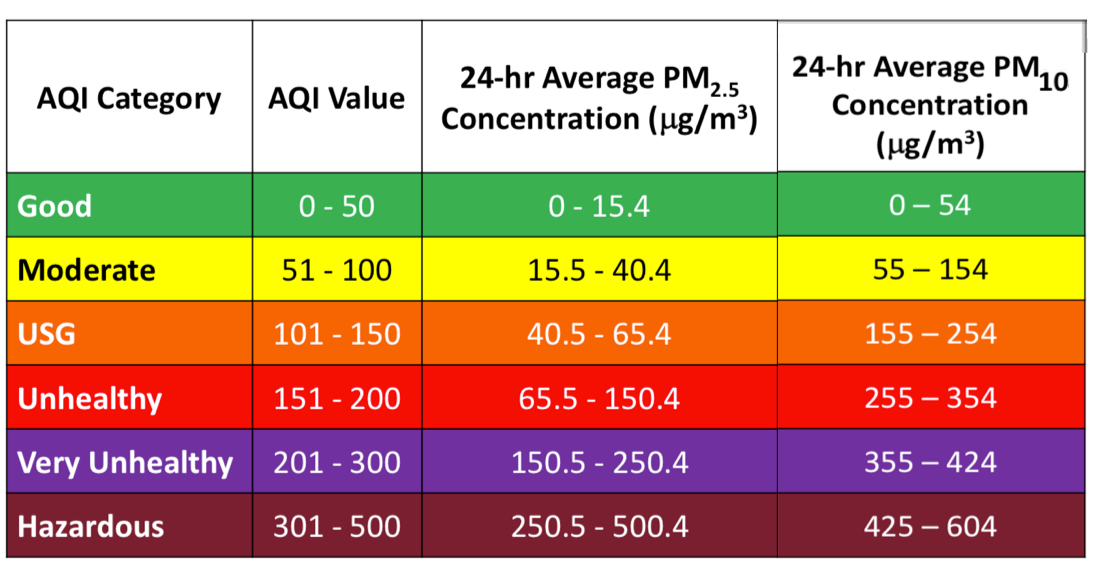
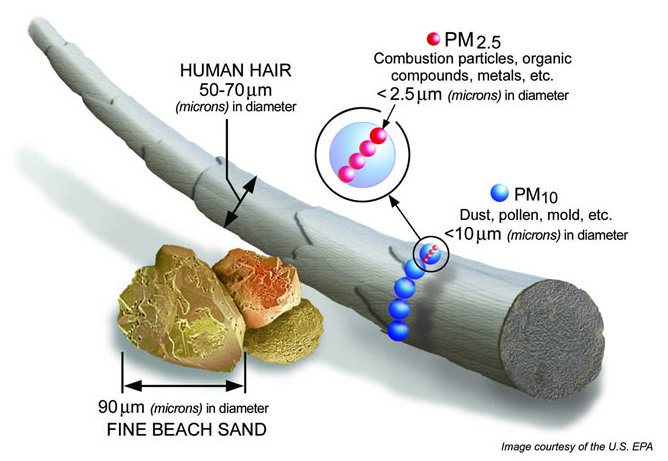
Before we get into output and the build details, you should understand the two measurements that matter, PM2.5, and PM10. PM2.5 refers to atmospheric particulate matter (PM) that have a diameter of less than 2.5 micrometers, which is about 3% the diameter of a human hair. PM10 is particulate matter 10 micrometers or less in diameter.
The chart above helped us build the logic to determine if the air quality was good or poor, to color code air quality status based on the PM2.5 and PM10 readings, set thresholds, and trigger alerts; the following infographic helped us understand what the metrics above meant.
Source: https://blissair.com/what-is-pm-2-5.htm
Initial State live air quality index feed from my basement
This was a great project because it answered a question, it became the prototype for air sensors built and placed strategically throughout my home, and more importantly because I got to spend time with my daughter Eden, sharing my love for technology and getting her excited to build something and see the results of her focus and effort.
This weekend’s project is an online shopping/delivery service scraper using scrapy to alert via Pushover when a grocery delivery slot becomes available.
I have to share this, because regardless of how you feel about COVID-19, when there is a virus that has a contagion level that we believe this virus has, avoiding confined spaces like a steel tube with 300 other people, mass transit, festivals, conferences, etc. is probably a prudent decision.
In my case, this is not an economic decision. Still, the idea that many who have scheduled personal travel could lose thousands of dollars because they are making the responsible decision to delay their plans is unconscionable. Many people will travel because they can’t afford NOT to, this doesn’t seem right, it’s stupid, and it’s wrong.
I am not in a state of fear. In fact, I have no issues traveling. I believe humanity will go on, but it demonstrates good corporate responsibility to create travel restrictions, to encourage people to work from home, and to avoid mass transit and areas where contagion is more likely. These responsibilities extend to all corporations, especially those in the travel and leisure industry because many people will make the wrong decisions because of your imposed policies and the economic hardships you impose upon them. No individual should feel that they do not have a choice in a time like this.
Regardless of if I get the money I seek below, in the form of a credit or refund, I will not be traveling next week, but this is not a luxury everyone has, and it seriously disturbs me. I have faith that humanity will go on, and I have hope that organizations that do not do the right things will suffer the perils of their decisions.
ME: Hello, I need to cancel my trip to San Francisco next week as a result of a corporate travel ban due to COVID-19. Can you please cancel my flights and hotel and let me know the outcome (refund, credit, etc.). I suspect this will be the first of many cancellations, just waiting to hear about future events. Thank you.
AGENT: Hello Richard!
ME: Hello
AGENT: I hope you are doing well today. I’ll be happy to assist!
ME: Thanks
AGENT: No problem! For your flight, you will have about a $256.80 credit, and for the hotel, it is non-refundable.
ME: Ummmm, so given the national panic, the hotel is holding that line. Wow!!
ME: And United is waiving all change fees for all flights in March, so that makes no sense.
ME: If the above is true, do NOT cancel, and I will call United and the hotel directly because this cannot be.
AGENT: I understand your concern, Richard. The waived fees are for new flights booked between March 3 and March 31, 2020. Unfortunately, your flight was booked Feb 4th.
ME: I will handle it. Thank you.
ME: Please confirm you canceled nothing.
AGENT: I apologize for this, Richard. No changes have been made.
AGENT: Richard, If you need anything else, please feel free to reach out to our 24/7 support team. Have a great day. ?
ME: Thought you might like to know that Hyatt says that it’s your policy, not theirs.
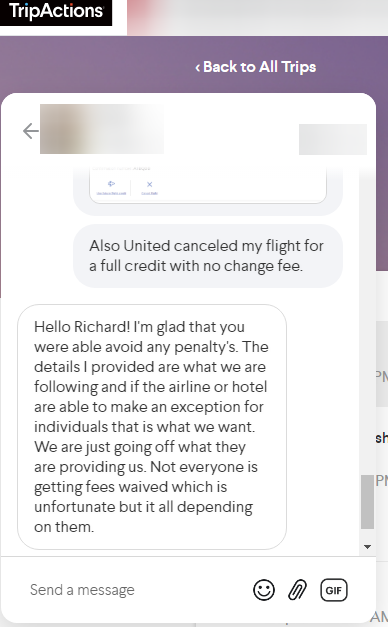
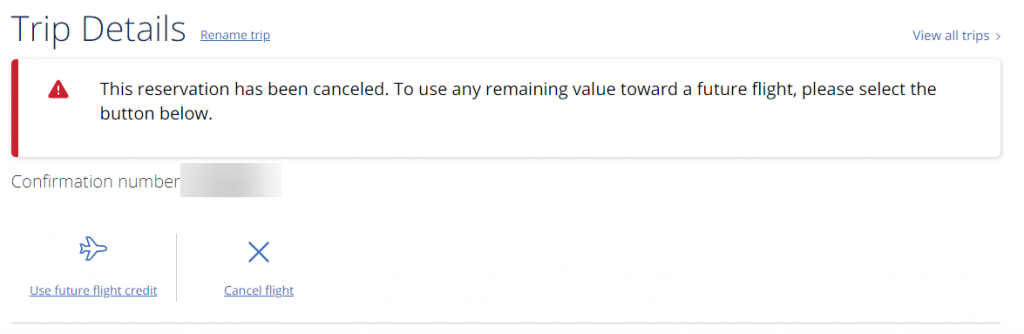
ME: Also United canceled my flight for full credit with no change fee.
AGENT: Hello Richard! I’m glad that you were able to avoid any penalty. The details I provided are what we are following and if the airline or hotel is able to make an exception for individuals that is what we want. We are just going off what they are providing us. Not everyone is getting fees waived which is unfortunate but it all depending on them.
ME: That’s interesting given they say it’s you, not them. So I will relay the message that it’s them, not you.
AGENT: As for the Hotel response, I’m not sure they understood. The booking was made directly with the hotel using our platform. We can cancel it on our end, but they would need to process a refund on their end. You might be chatting with the reservation team. We would need to check with the hotel directly. They might think we are like Expedia, etc.
ME: Yeah, I know this. And given the situation, I believe it’s the hotel that should be able to make the change. I have done this before, and I am only asking that they credit the $s for a future stay, not that they refund the dollars.
ME: Whether you believe COVID-19 will end the world or not, there is a sense of corporate responsibility that should be in play, given the situation.
ME: Would you like to try to call the property?
AGENT: I completely understand Richard. Its been pretty much a case by case situation for everyone who has needed to cancel their traveling plans. We want all our travelers to have the best outcome with their cancellations.
AGENT: I’ll be happy to call them and see if they will refund the reservation.
ME: I don’t want a refund. That would not be equitable. I only want the ability to rebook in the future.
ME: A credit with the property. It is reasonable on my part and reasonable on the hotel’s part to do this because we would both be acting responsibly at a time when this is the right thing to do.
ME: This isn’t even my money, but I find it unconscionable that someone would travel because they feel boxed in because of the financial impact.
ME: It’s really pretty sad.
AGENT: I can ask about that. The only difficulty I see is that they may say no due to not keeping the same room rates. Did you have a specific time in mind to change to?
AGENT: If you don’t have a specific date range, I’ll see what they can do.
AGENT: I’m calling the property now.
ME: The est cost of the stay is $1,219.73. Just give me a year to rebook, if there is a rate fluctuation up, I will pay the difference, if there is rate fluctuation down the hotel can keep the difference.
ME: I wish I knew when the COVID-19 situation would over, but I don’t. If I did, I probably would fly private and own a property in NorCal that I would stay at.
AGENT: Richard I spoke to the property, and they advised we would need to speak to their in house reservation team. They are currently unable to make changes or cancel due to being an advance purchased non-refundable room. They said we could speak to the in house reservation team on Monday and see if they could further assist.
ME: OK, I guess we will wait until Monday. Thanks
AGENT: No problem Richard. Please chat back in on Monday, and we can give them a call and see what can be done for your booking.
ME: OK
FWIW, I think it’s pretty sad given the COVID-19 situation that anyone taking calls in the travel industry right now on a 24×7 basis would not be personally empowered or have someone to go to who is empowered to make the logical and responsible decisions. This is the corporate brand you are playing with, I can only hope that your desire for short-term gain delivers long-term pain. If COVID-19 is teaching us one thing it’s that the world is flat, and in 2020 I believe that good and bad corporate behavior has an unprecedented contagion rate.
The year is 2020, and the world has changed and continues to change, in many ways, some of the changes concern me, but in many ways, the changes are fantastic! I am personally most excited by the reinvention of the American Dream. The American Dream is no longer a job for life and homeownership; it’s our ability to take control of our destiny, our ability to expect more and accept less. While there are many powerful lessons to be learned from the assimilation and stoicism of the silent generation, it is our desire to blaze the trail and our willingness to fail that has shifted energy from assimilation to creation, and this is fantastic! But make no mistake, in order to dominate thy destiny in a market with unprecedented opportunity, unprecedented new entrants, and unprecedented velocity we will need to have unprecedented focus, discipline, and ability. Doing the ‘job’ is no longer enough because being a creator requires inspiration that transcends the work, our destiny will be determined by our desire and ability to envision the future and our commitment to making it so.
I was on a flight back from AWS re:Invent 2019 (LAS => EWR) in early December, and I had a thought, not the first time I had the idea, but the first time I realized how I might make the idea into something tangible that would allow me to support my thought process.
The thought goes something like this: While I am not independently monetarily wealthy, I’ve worked hard to construct a lifestyle that measures wealth in terms of what makes me happy and satisfied. My satisfaction and motivation are derived from mastery, purpose, and autonomy. It is this idea that got me to thinking about the type of environment that I need to be in to feel fulfilled as opposed to frustrated, and my ability to influence satisfaction. Fulfillment and satisfaction are complicated topics, and it’s easy to get frustrated. What we need to realize is that we have an immense amount of control over our fulfillment and satisfaction, but we also need to hold ourselves accountable. Then I started thinking about the work, and the fact that mastery, purpose, and autonomy drive me, and these are profoundly personal. Most who know me have heard me reference achieved versus ascribed status at least once or twice. I don’t believe in ascribed status, in fact, it is one of the things in life that frustrates me the most. I believe that I was put here on earth to work hard, to build knowledge, to consider context, to apply logic and reason to decision making, to expect more of myself and others, and to challenge everything that I cannot rationalize. There are no sacred cows grazing in my pasture! The shift from achieved to ascribed status is an easy one, and it can be a dangerous shift, it is at this point that our drive and our influence are in decline. I then asked myself, what do I respect? Hypothetically speaking, if I were to go out and interview tomorrow, what sort of organization and culture would fulfill me versus frustrate me. I then started to think that fulfillment and satisfaction are hard when those around you don’t look at mastery, purpose, and autonomy in the same way you view these satisfaction hygiene factors.
So I started pondering, what if I could create a simple gate that would quickly identify if a prospective culture was the right or the wrong culture, a culture that would embrace my profession as a spiritual calling, not a paycheck. These ideas frame how I think about my mission in life, my vision of how I can continue to push myself, the values I hold dear that I hope to instill in my children, but they also influence my expectations.
So as of today, if you want to review my CV (curriculum vitae, aka resume), make a REST call to my CV API. Can’t make a REST call to my API, don’t want to discuss how I built the API, my CI/CD process, etc. then we would likely spend our days together frustrated, unsatisfied and unfulfilled, so this is probably not a fit. It’s 2020, as employers, we should desire to interview less and to be questioned more by those looking to join a team and a culture that satisfies and fulfills them. It’s an individual’s desire for mastery, purpose and autonomy and our ability to nurture these individuals that will satisfy them and create organizational success that others will look at in awe!
Go ahead and give the CV API a try, and if you find yourself interviewing with me (or presenting at my kickoff meeting), make it different, challenge me, make me uncomfortable, make me leave the interview feeling like I am a worthless piece of matter that lacks mastery and purpose.
Version 1 of the CV API only allows for REST GET requests. I am currently working on the ability to inquire via API with a REST POST request, where inquiries can be made programmatically and will notify me via Pushover, Telegram or Slack.
This post is not 100% complete, but with the 2020 Digital Innovation Kickoff fast approaching, I wanted to get it published and shared with my team so they could understand the thought I put into my 2020 Digital Innovation Kickoff Project. I am holding off on making my GitHub and Docker Hub repositories publicly visible because I want the team to do the research and build their app and DevOps pipeline. Before our kickoff on March 12, 2020, I will update this post to include links to my public GitHub and Docker Hub repositories as well as documentation on my build and deploy process.
In 1971 while at Xerox PARC Alan Key in response to managers wanting to know how to plan future products, stated that “The most reliable way to forecast the future is to invent it.” We have the ability to create our future, we have a responsibility to influence the future and we have accountability for what our tomorrow will look like.
First, let me clarify the title of this blog a bit. Obviously, it’s a hashtag followed by a string of hashtags which I view as a progression, but for me, it’s all about “The Dream”. What’s interesting about the “The Dream” is how varied living it can be, for me it’s always been about waking up in the morning knowing I had to go to work, but making work something that fulfilled my dream and some portion of a dream for others. So when I think about the term “The Dream” objectively what comes to my mind is a question; what dream, whose dream? The answer to this question in my mind is my dream, your dream, our dream. The rhetorical question and the answer are pretty telling about how I view teamwork, how I view the purpose and the motivation behind teamwork and how important community and culture is to me and to achieving the dream, more on the dream in a bit. Just like I view everything in life, pragmatically, dreams need to be equitable to be achievable; they can be lofty, but they need to be equitable. Our dreams should satisfy ourselves, satisfy others, satisfy our team, satisfy our customers, etc… When we can align our dreams, we can align our purpose, motivation, and efforts and greatly increase the probability of achieving our dreams.
It is and always has been my belief that engineers should understand things at a different level; a deeper level, concerning themselves less with the finished product (aka the what) and more with the why and how. Engineering is NOT about marchitecture and best practices, memorization and regurgitation, it’s never about the fastest path and often is about the most learned path, it’s about thirsting for and developing a deep understanding of the details. A deep understanding of the theory and the applied logic is the foundation for the wisdom that allows us to develop new and novel ideas. Execution of someone else’s idea is imitation and as engineers, we are here to innovate not imitate.
I think of this process and our evolution as engineers in the following way:
We need to feed our brains data. Cognition then needs to take over and convert data into information and eventually into knowledge.
We then need to apply what we already know too that which our conative skill just processed.
We can then take the context of a current situation, all the data about the current situation, mash it together with knowledge which we already possess, and begin to make some decisions. The ability to make these decisions or judgment calls without a clear roadmap requires a corpus of knowledge which is big enough that we can apply logic and reason and decisions on what is and is not likely applicable in a given situation. This is where wisdom becomes a differentiator.
It is my belief that value is derived by accelerating the velocity of vertical conversion of information to knowledge (aka cognition), etc.. and accelerating our ability to solve the equation, the faster we are at solving the equation the faster we can conjure and commit and the more value we will deliver. This is the process that I value most and the process that I believe the market values most.
In summary, engineers need to possess the ability to conjure and commit. Doing this well requires developing our cognitive skills, knowledge and wisdom. As engineers, we need to be committed to and satisfied by the journey, not the destination. This past weekend I binged watched Losers on Netflix and for those who need an easy way to make the value of losing and failure tangible, episode one and the story of Michael Bentt does a pretty good job.
With that bit of background out of the way, we can now move on to the annual Expert Services Retreat/Kickoff. I use the terms “retreat” and “kickoff” interchangeably because this event is really both, a time to congratulate ourselves and our peers for a job well done, a time to reflect on and learn from our mistakes, a time to blow off some steam and have a little fun, a time to strengthen our connection with each other, and a time to develop the skills that make us engineers. For the last eight years or so the Expert Services team has been taking an annual trip. These three-day events are designed to focus on reviewing our business from the prior year, charting our course for the upcoming year, connecting with each other, challenging each other and ourselves and emerging a bigger, faster and stronger as individuals, as leaders and as a team. Those who know me know the genesis of this event, and without exploring it in detail, what I will say is that I believe the team and only the team can achieve greatness, what we do can not work on the back of any one individual, success and failure is the result of the team 100% of the time. This team works 24x7x365, without a team dynamic and culture that supports this, the business just doesn’t work, and I would argue society doesn’t work, but this post has already metastasized far beyond what I intended so I’ll save the society discussion for another time. Expectations are always high, but they differ from individual to individual, this is logical. E.g. – We don’t expect our long snapper to run 4.4 40, yet our long snapper is just as important as someone who runs a 4.4 40. Every role has significance and we expect execution at a high-level within a role. My expectation is that as teammates we will always put others above ourselves and we will expect others to do the same; if we can execute on this mission we are destined for greatness.
Without humility, community and a belief in something bigger than ourselves we are merely swirling in the vortex individualism. By the time we realize that the force of the vortex is too intense to handle alone, it is too late. It’s not a question of if the center will hold but rather when it will give way. Building a great team is about the realization by everyone in the community that at some point the swirling vortex will be too powerful for us to handle alone and that our only hope for the future is a community. When we love what we do, we want to sustain it, when we love what we do, we will take measures and make sacrifices to build a community that greatly increases the probability that we can keep doing what we love. This is culture, this is the foundation on which great teams and great organizations are built.
What a great team!!!
Nothing says “engineer” like cloning one of your team who couldn’t make it because they had to stay home to have a baby. We have one missing team member in the picture above because he couldn’t make it at the last minute and we just didn’t have time to clone him.
For the past eight years or so, Atlantic City, New Jersey in February has been home to the Expert Services Retreat/Kickoff, with a deviation two years ago to Philadelphia. Like everything in Expert Services we favor yield and Atlantic City has always provided what we needed with the best yield. 2018 was a really good year for the team, we nearly doubled our business, our customer base and the number of account executives we are working with, so we decided to pick a destination for the 2019 Expert Services Retreat/Kickoff. So this year we all headed to Clearwater Beach, Florida. It turned out to be a great location and a great venue.
Our agenda was a three-day trip filled with business, pleasure and a technical project aimed at making us better engineers, this year’s being the Autonomous Car Challenge.
Day One
The day starts with early morning flights into Tampa, Florida. Upon arrival, we transferred from the airport to the hotel to quickly check-in and drop off our bags before heading out to our planned team event; a suite at Spectrum Field for a spring training game between Philadelphia Phillies vs. Detroit Tigers. Thank you to Dell Technologies for sponsoring this great team event, what a great day.
On the evening of day one, the Expert Services team headed to Frenchy’s Saltwater Cafe a casual and fun beach spot for dinner and libations, with or new teammates from Computacenter, our partners Dell Technologies and Forte Data Solutions. Thank you to Forte Data Solutions, the Expert Services team go to database partner for sponsoring dinner, it was great to have you there and explore how we can further strengthen our relationship and GTM approach in 2019.
Not sure we could have had a better day for a baseball game.
Day one was a great day and we were happy to share it with each other, our new friends and our partners from Dell Technologies and Forte Data Solutions.
Day Two
Day two began with yours truly talking about purpose, passion, motivation, commitment and connection as the true difference makers. Ever since I attended a leadership workshop at Harvard and was introduced to Dan Pink’s video “The surprising truth about what motivates us” video and later read his book “Drive: The Surprising Truth About What Motivates Us” my thoughts on what it takes to be truly driven and what it takes to be a disruptor has been tightly moored to the purpose motive.
Following opening statements, which actually took a couple of hours, in my defense I did provide a state of the business which took most of that time, we settled in for a partner presentations from Dell Technologies and Forte Data Solutions.
Following the partner presentations, we rolled into a team building exercise using legos to teach the Cynefin framework. Next up was a customer empathy session, because the best way for us to improve is to make the effort to understand how our actions impact our customers. A subset of the team then delivered their personal presentations where they reflected on their 2018 goals, made some decisions and set 2019 personal goals. We finished up the day with a with a presentation by “The Engine Ears” presenting on their autonomous vehicle build process.
Day two came to a close with dinner and libations at the Clear Sky Beachside Cafe sponsored by Qlyitcs. The Expert Services team partners with Qlytics and leverages the Q-PLATFORM to help our customers accelerate their Artificial Intelligence (AI) journey.
Day Three
Day three kicked off with updates on DigitalMe and service delivery for one of the largest Computacenter customers. We then had a partner presentation by Qlytics, continued on with more personal presentations, followed by a presentation from team “Johnny Cab” on their autonomous vehicle build process. We closed out the formal presentations on day three with a presentation from the autonomous vehicle challenge mentors, and an update on engineering organization.
With all the formal presentation work out of way, it was time to move on to the head-to-head autonomous vehicle challenge where the work over the last two months would be put on display. We streamed this 2.5-hour session on YouTube Live, it was a blast, but also stressful for the participants.
Following the day’s activities and stress (being open and honest isn’t always a cakewalk, self-realization can be a very taxing process) we chilled at the hotel with a private reception.
The Autonomous Vehicle Challenge
In early January the Expert Services team was divided into three teams: “Johnny Cab”, “The Engine Ears” and “The Mentors”. “Johnny Cab” and “The Engine Ears” (self-named) would have two months to work together to build a 1/16th scale autonomous vehicle, implement the infrastructure and software stack/frameworks, gather training data, train and tune their AI models and test their vehicles, document their process and ready a team presentation in preparation for presentations and a head-to-head competition at the Expert Services Retreat/Kickoff at the end of February. The journey was priceless, the teams learned a lot about each other, they learned a ton about so many facets of technology and how little things like training on GPUs vs. CPUs can really accelerate your ability to experiment. They learned why the cloud is so valuable, realizing that by spending a few dollars in the cloud with a service like Paperspace they could train a model that took hours on their laptop in minutes. The teams spent significant discretionary time over the two months working together and journaling their progress on Twitter (#xs2019). It was a challenging project, but I believe the project helped people connect, exposed a few things we need to work on as a team and delivered a depth of understanding of machine learning and autonomous vehicles that is deeper and superior to most, this is what being an engineer is all about.
Engineers always travel with their own soldering iron, you just can’t get a quality solder joint with a borrowed soldering iron.
I love this team, I love the intensity they attack these projects with, and I love the preparation they put into getting ready for this event each year. This video snippet from the full-length streamed YouTube Live broadcast truly captures how awesome this team and this event is.
Note: The video contains celebratory expletives.
I can say with a high degree of confidence that you could search VARdom and not find a group of engineers this size who have an applied grasp of computer vision, supervised learning, and autonomous vehicles the way this team does, and this is what it is all about!!!