It’s been a while since my last post, but I just finished putting a Graylog container behind a Caddy reverse proxy, and because I found the existing documentation to be pretty sparse I thought I would quickly share my Caddy docker-compose.yml and my Graylog docker-compose.yml, and other tidbits that might help others out.
Completed this project on Saturday, March 28th, 2020 but it took my spare time this week to write the README.md for the project and this blog. This post tells the story of one example of how I am making productive use of my time sheltering-in-place; how I am leveraging the time to tackle todo tasks, how I am leveraging the time to educate, how I am leveraging the time to spend quality family time and how I am doing it with passion and excitement.
Note: Be sure to scroll down to see my live basement air quality index stream.
While I am social distancing and sheltering-in-place, I am taking the opportunity to tackle some of the questions of inquiring minds. One such question comes from my wife: “Is the air quality in the basement safe?”
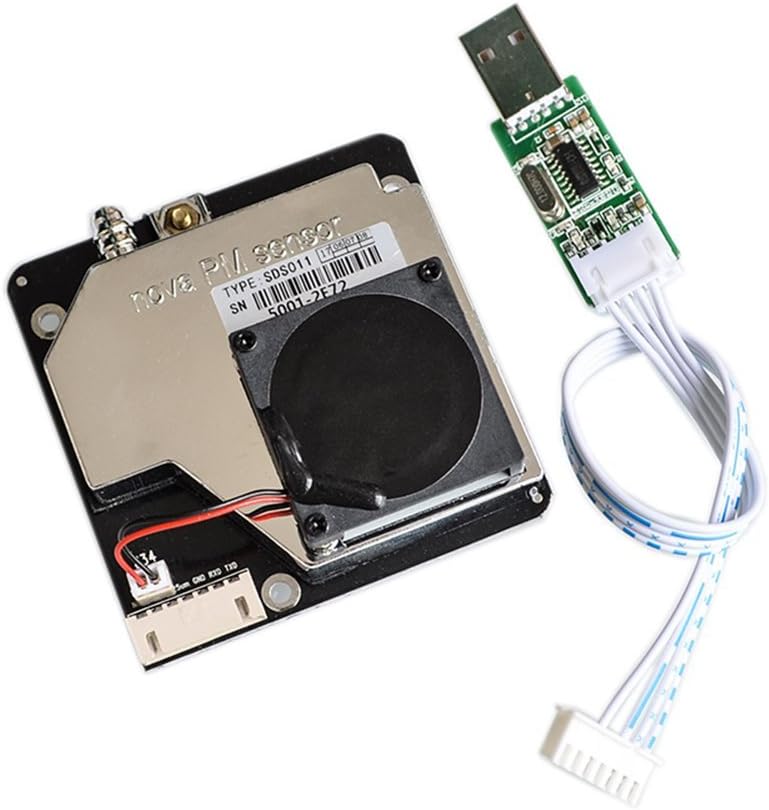
This weekend Eden (my daughter) and I tackled researching air quality metrics, and then we build our very own air quality monitor.
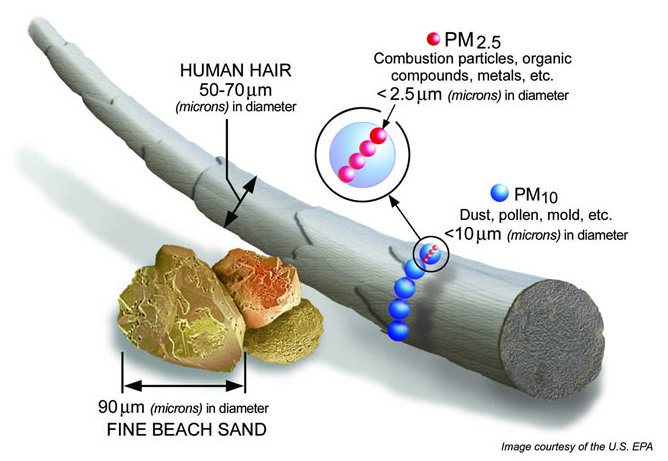
Before we get into output and the build details, you should understand the two measurements that matter, PM2.5, and PM10. PM2.5 refers to atmospheric particulate matter (PM) that have a diameter of less than 2.5 micrometers, which is about 3% the diameter of a human hair. PM10 is particulate matter 10 micrometers or less in diameter.
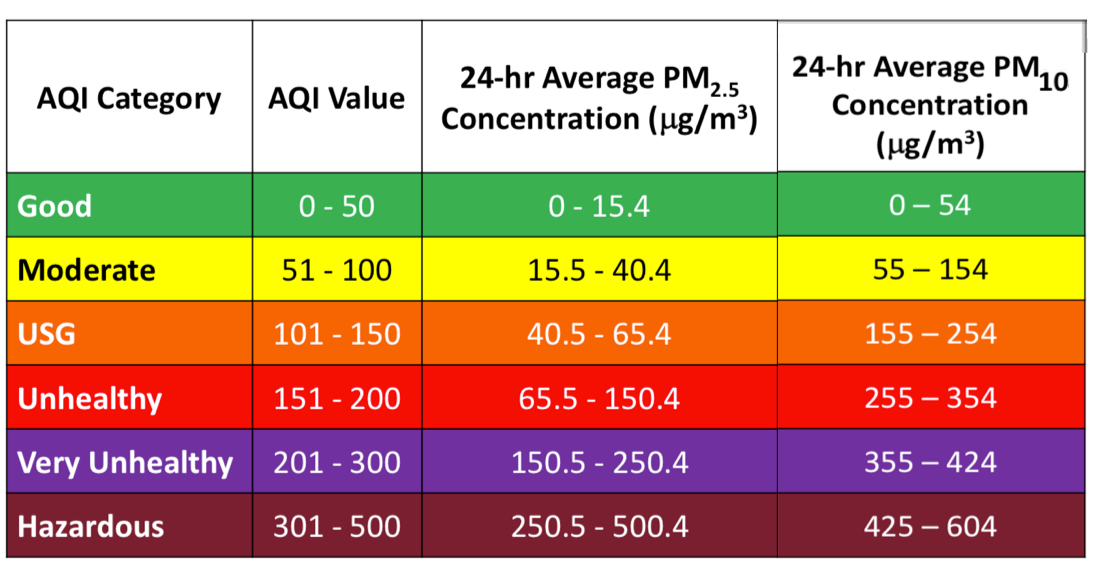
The chart above helped us build the logic to determine if the air quality was good or poor, to color code air quality status based on the PM2.5 and PM10 readings, set thresholds, and trigger alerts; the following infographic helped us understand what the metrics above meant.
Source: https://blissair.com/what-is-pm-2-5.htm
Initial State live air quality index feed from my basement
This was a great project because it answered a question, it became the prototype for air sensors built and placed strategically throughout my home, and more importantly because I got to spend time with my daughter Eden, sharing my love for technology and getting her excited to build something and see the results of her focus and effort.
Prototype Air Quality Index (AQI) Monitor
AQI Project Code
https://github.com/rbocchinfuso/aqi
AQI Github Repo
This weekend’s project is an online shopping/delivery service scraper using scrapy to alert via Pushover when a grocery delivery slot becomes available.
First, let me clarify the title of this blog a bit. Obviously, it’s a hashtag followed by a string of hashtags which I view as a progression, but for me, it’s all about “The Dream”. What’s interesting about the “The Dream” is how varied living it can be, for me it’s always been about waking up in the morning knowing I had to go to work, but making work something that fulfilled my dream and some portion of a dream for others. So when I think about the term “The Dream” objectively what comes to my mind is a question; what dream, whose dream? The answer to this question in my mind is my dream, your dream, our dream. The rhetorical question and the answer are pretty telling about how I view teamwork, how I view the purpose and the motivation behind teamwork and how important community and culture is to me and to achieving the dream, more on the dream in a bit. Just like I view everything in life, pragmatically, dreams need to be equitable to be achievable; they can be lofty, but they need to be equitable. Our dreams should satisfy ourselves, satisfy others, satisfy our team, satisfy our customers, etc… When we can align our dreams, we can align our purpose, motivation, and efforts and greatly increase the probability of achieving our dreams.
It is and always has been my belief that engineers should understand things at a different level; a deeper level, concerning themselves less with the finished product (aka the what) and more with the why and how. Engineering is NOT about marchitecture and best practices, memorization and regurgitation, it’s never about the fastest path and often is about the most learned path, it’s about thirsting for and developing a deep understanding of the details. A deep understanding of the theory and the applied logic is the foundation for the wisdom that allows us to develop new and novel ideas. Execution of someone else’s idea is imitation and as engineers, we are here to innovate not imitate.
I think of this process and our evolution as engineers in the following way:
We need to feed our brains data. Cognition then needs to take over and convert data into information and eventually into knowledge.
We then need to apply what we already know too that which our conative skill just processed.
We can then take the context of a current situation, all the data about the current situation, mash it together with knowledge which we already possess, and begin to make some decisions. The ability to make these decisions or judgment calls without a clear roadmap requires a corpus of knowledge which is big enough that we can apply logic and reason and decisions on what is and is not likely applicable in a given situation. This is where wisdom becomes a differentiator.
It is my belief that value is derived by accelerating the velocity of vertical conversion of information to knowledge (aka cognition), etc.. and accelerating our ability to solve the equation, the faster we are at solving the equation the faster we can conjure and commit and the more value we will deliver. This is the process that I value most and the process that I believe the market values most.
In summary, engineers need to possess the ability to conjure and commit. Doing this well requires developing our cognitive skills, knowledge and wisdom. As engineers, we need to be committed to and satisfied by the journey, not the destination. This past weekend I binged watched Losers on Netflix and for those who need an easy way to make the value of losing and failure tangible, episode one and the story of Michael Bentt does a pretty good job.
With that bit of background out of the way, we can now move on to the annual Expert Services Retreat/Kickoff. I use the terms “retreat” and “kickoff” interchangeably because this event is really both, a time to congratulate ourselves and our peers for a job well done, a time to reflect on and learn from our mistakes, a time to blow off some steam and have a little fun, a time to strengthen our connection with each other, and a time to develop the skills that make us engineers. For the last eight years or so the Expert Services team has been taking an annual trip. These three-day events are designed to focus on reviewing our business from the prior year, charting our course for the upcoming year, connecting with each other, challenging each other and ourselves and emerging a bigger, faster and stronger as individuals, as leaders and as a team. Those who know me know the genesis of this event, and without exploring it in detail, what I will say is that I believe the team and only the team can achieve greatness, what we do can not work on the back of any one individual, success and failure is the result of the team 100% of the time. This team works 24x7x365, without a team dynamic and culture that supports this, the business just doesn’t work, and I would argue society doesn’t work, but this post has already metastasized far beyond what I intended so I’ll save the society discussion for another time. Expectations are always high, but they differ from individual to individual, this is logical. E.g. – We don’t expect our long snapper to run 4.4 40, yet our long snapper is just as important as someone who runs a 4.4 40. Every role has significance and we expect execution at a high-level within a role. My expectation is that as teammates we will always put others above ourselves and we will expect others to do the same; if we can execute on this mission we are destined for greatness.
Without humility, community and a belief in something bigger than ourselves we are merely swirling in the vortex individualism. By the time we realize that the force of the vortex is too intense to handle alone, it is too late. It’s not a question of if the center will hold but rather when it will give way. Building a great team is about the realization by everyone in the community that at some point the swirling vortex will be too powerful for us to handle alone and that our only hope for the future is a community. When we love what we do, we want to sustain it, when we love what we do, we will take measures and make sacrifices to build a community that greatly increases the probability that we can keep doing what we love. This is culture, this is the foundation on which great teams and great organizations are built.
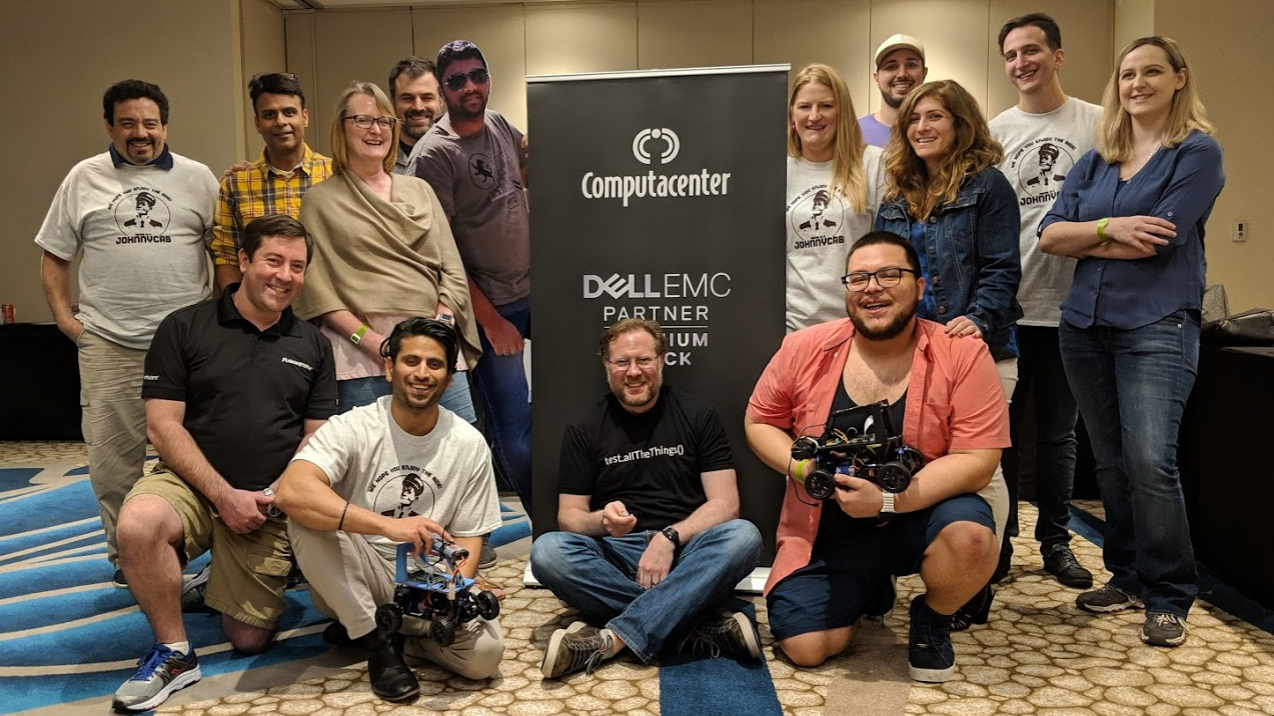
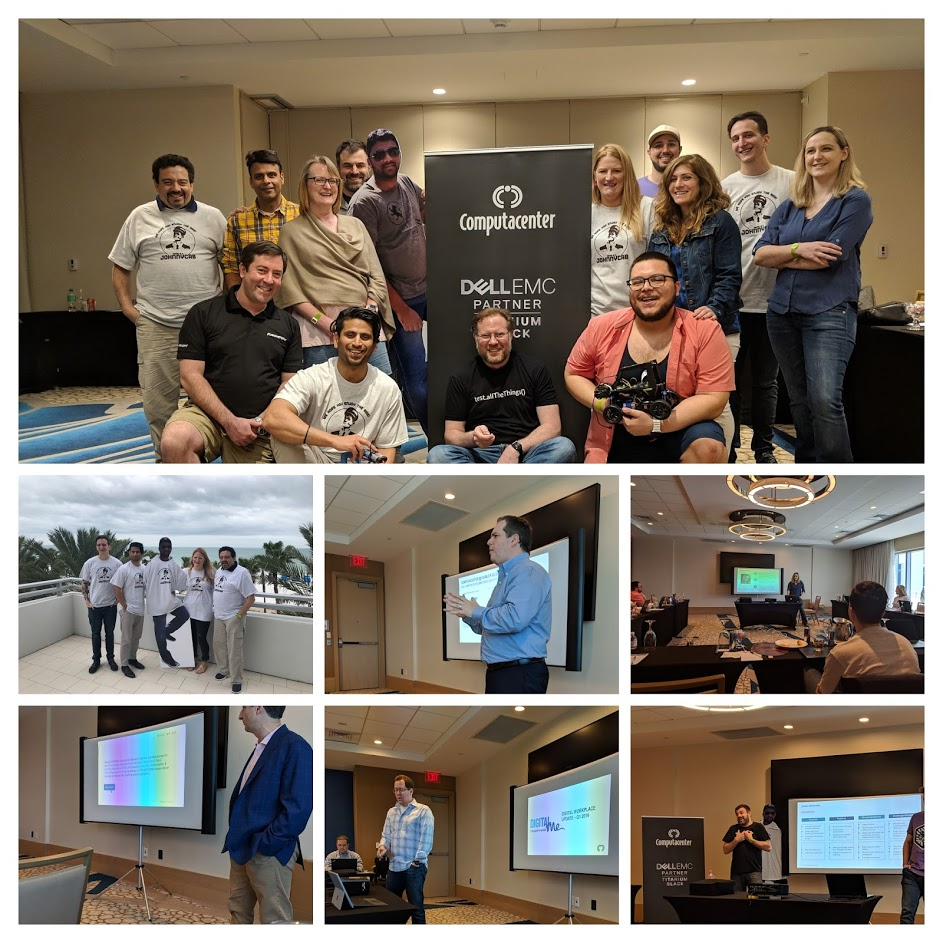
What a great team!!!
Nothing says “engineer” like cloning one of your team who couldn’t make it because they had to stay home to have a baby. We have one missing team member in the picture above because he couldn’t make it at the last minute and we just didn’t have time to clone him.
For the past eight years or so, Atlantic City, New Jersey in February has been home to the Expert Services Retreat/Kickoff, with a deviation two years ago to Philadelphia. Like everything in Expert Services we favor yield and Atlantic City has always provided what we needed with the best yield. 2018 was a really good year for the team, we nearly doubled our business, our customer base and the number of account executives we are working with, so we decided to pick a destination for the 2019 Expert Services Retreat/Kickoff. So this year we all headed to Clearwater Beach, Florida. It turned out to be a great location and a great venue.
Our agenda was a three-day trip filled with business, pleasure and a technical project aimed at making us better engineers, this year’s being the Autonomous Car Challenge.
Day One
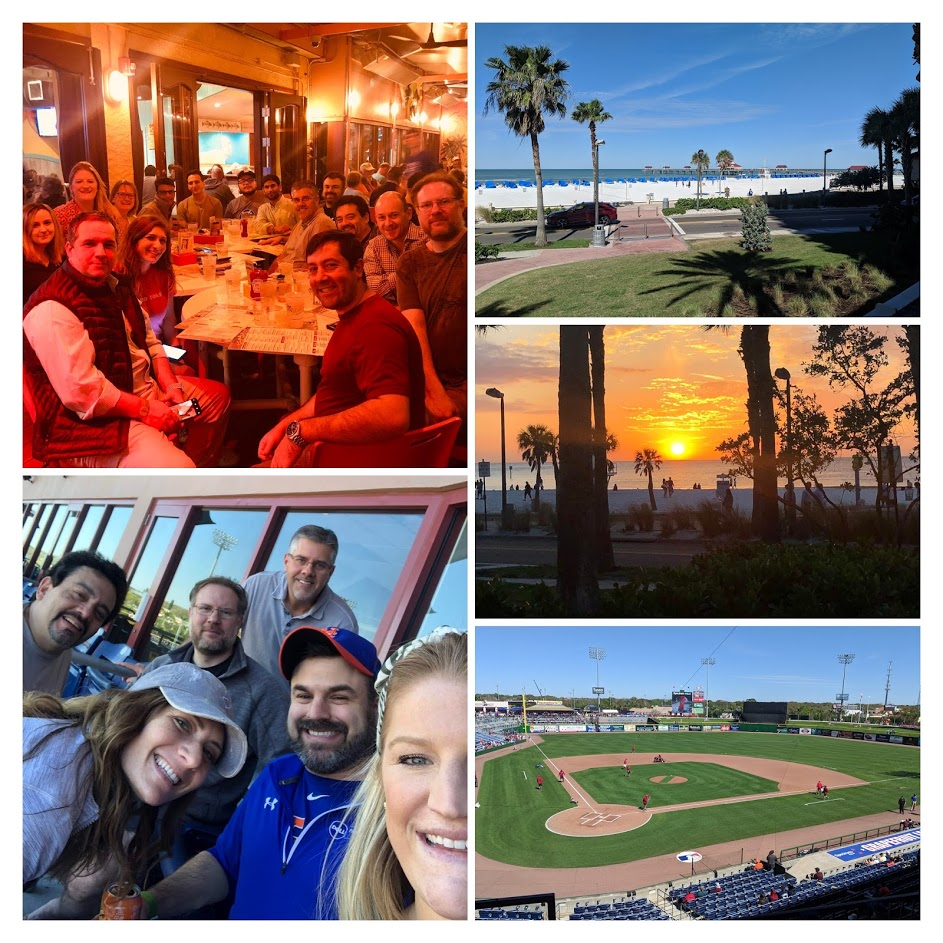
The day starts with early morning flights into Tampa, Florida. Upon arrival, we transferred from the airport to the hotel to quickly check-in and drop off our bags before heading out to our planned team event; a suite at Spectrum Field for a spring training game between Philadelphia Phillies vs. Detroit Tigers. Thank you to Dell Technologies for sponsoring this great team event, what a great day.
On the evening of day one, the Expert Services team headed to Frenchy’s Saltwater Cafe a casual and fun beach spot for dinner and libations, with or new teammates from Computacenter, our partners Dell Technologies and Forte Data Solutions. Thank you to Forte Data Solutions, the Expert Services team go to database partner for sponsoring dinner, it was great to have you there and explore how we can further strengthen our relationship and GTM approach in 2019.
Not sure we could have had a better day for a baseball game.
Day one was a great day and we were happy to share it with each other, our new friends and our partners from Dell Technologies and Forte Data Solutions.
Day Two
Day two began with yours truly talking about purpose, passion, motivation, commitment and connection as the true difference makers. Ever since I attended a leadership workshop at Harvard and was introduced to Dan Pink’s video “The surprising truth about what motivates us” video and later read his book “Drive: The Surprising Truth About What Motivates Us” my thoughts on what it takes to be truly driven and what it takes to be a disruptor has been tightly moored to the purpose motive.
Following opening statements, which actually took a couple of hours, in my defense I did provide a state of the business which took most of that time, we settled in for a partner presentations from Dell Technologies and Forte Data Solutions.
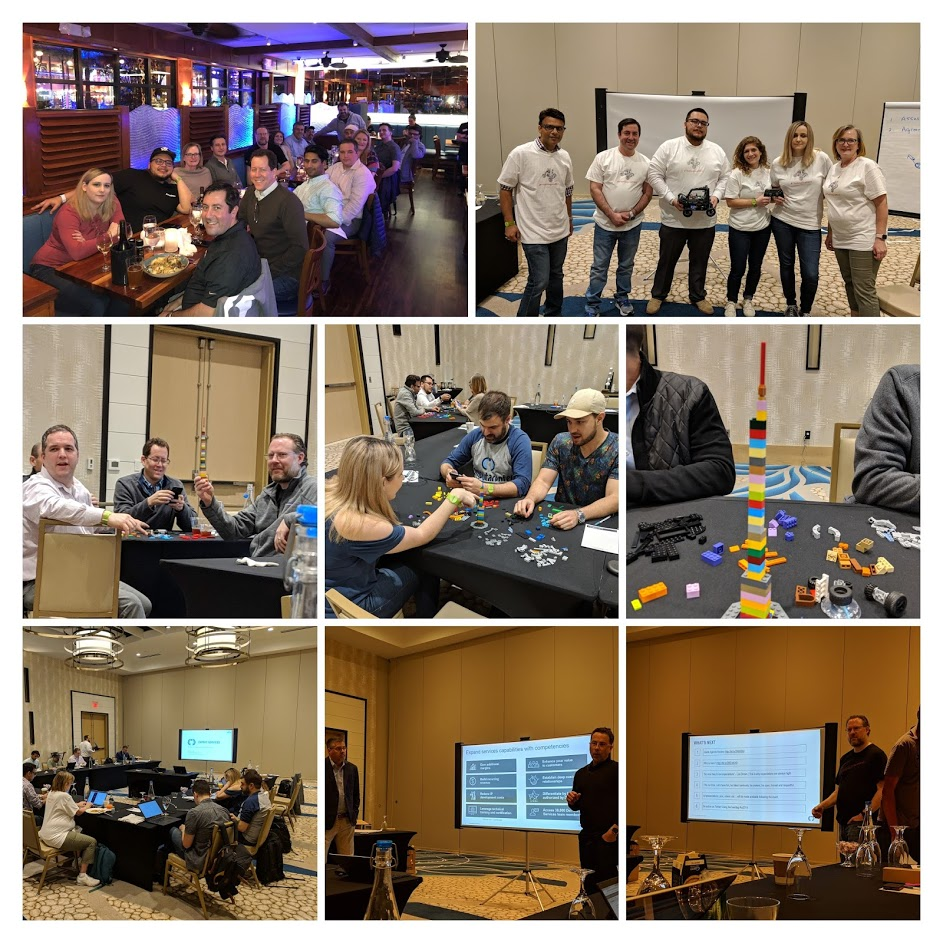
Following the partner presentations, we rolled into a team building exercise using legos to teach the Cynefin framework. Next up was a customer empathy session, because the best way for us to improve is to make the effort to understand how our actions impact our customers. A subset of the team then delivered their personal presentations where they reflected on their 2018 goals, made some decisions and set 2019 personal goals. We finished up the day with a with a presentation by “The Engine Ears” presenting on their autonomous vehicle build process.
Day two came to a close with dinner and libations at the Clear Sky Beachside Cafe sponsored by Qlyitcs. The Expert Services team partners with Qlytics and leverages the Q-PLATFORM to help our customers accelerate their Artificial Intelligence (AI) journey.
Day Three
Day three kicked off with updates on DigitalMe and service delivery for one of the largest Computacenter customers. We then had a partner presentation by Qlytics, continued on with more personal presentations, followed by a presentation from team “Johnny Cab” on their autonomous vehicle build process. We closed out the formal presentations on day three with a presentation from the autonomous vehicle challenge mentors, and an update on engineering organization.
With all the formal presentation work out of way, it was time to move on to the head-to-head autonomous vehicle challenge where the work over the last two months would be put on display. We streamed this 2.5-hour session on YouTube Live, it was a blast, but also stressful for the participants.
Following the day’s activities and stress (being open and honest isn’t always a cakewalk, self-realization can be a very taxing process) we chilled at the hotel with a private reception.
The Autonomous Vehicle Challenge
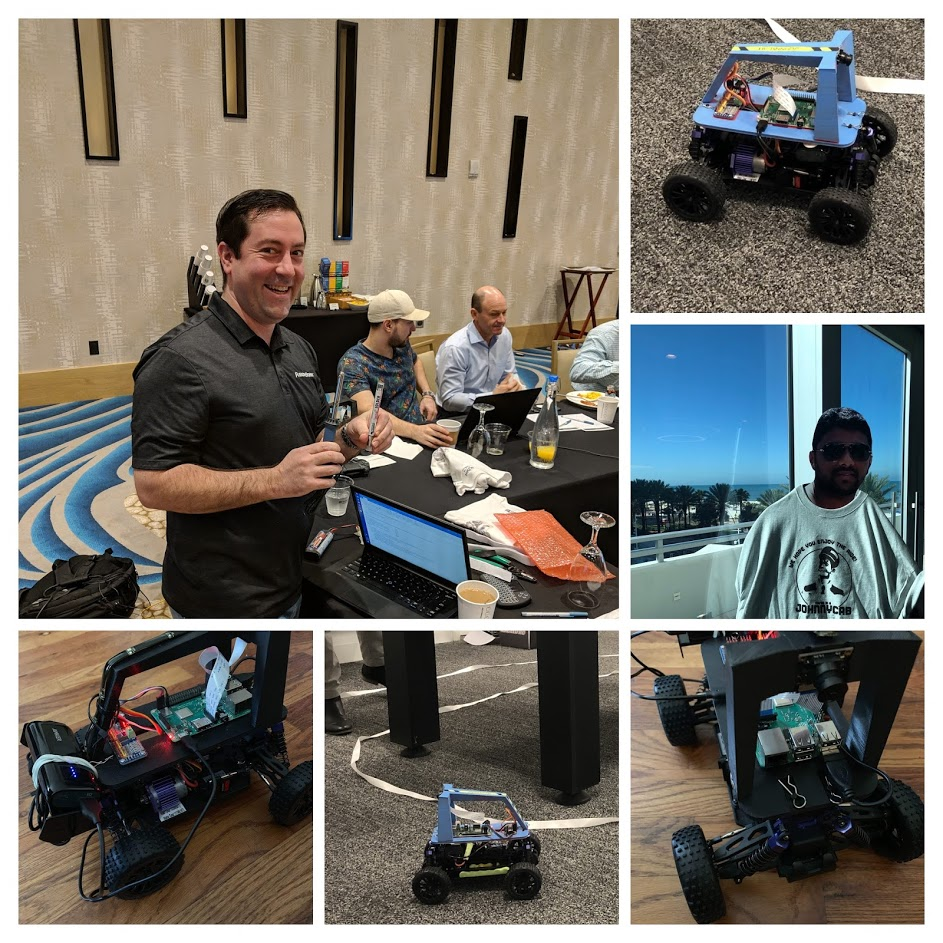
In early January the Expert Services team was divided into three teams: “Johnny Cab”, “The Engine Ears” and “The Mentors”. “Johnny Cab” and “The Engine Ears” (self-named) would have two months to work together to build a 1/16th scale autonomous vehicle, implement the infrastructure and software stack/frameworks, gather training data, train and tune their AI models and test their vehicles, document their process and ready a team presentation in preparation for presentations and a head-to-head competition at the Expert Services Retreat/Kickoff at the end of February. The journey was priceless, the teams learned a lot about each other, they learned a ton about so many facets of technology and how little things like training on GPUs vs. CPUs can really accelerate your ability to experiment. They learned why the cloud is so valuable, realizing that by spending a few dollars in the cloud with a service like Paperspace they could train a model that took hours on their laptop in minutes. The teams spent significant discretionary time over the two months working together and journaling their progress on Twitter (#xs2019). It was a challenging project, but I believe the project helped people connect, exposed a few things we need to work on as a team and delivered a depth of understanding of machine learning and autonomous vehicles that is deeper and superior to most, this is what being an engineer is all about.
Engineers always travel with their own soldering iron, you just can’t get a quality solder joint with a borrowed soldering iron.
I love this team, I love the intensity they attack these projects with, and I love the preparation they put into getting ready for this event each year. This video snippet from the full-length streamed YouTube Live broadcast truly captures how awesome this team and this event is.
Note: The video contains celebratory expletives.
I can say with a high degree of confidence that you could search VARdom and not find a group of engineers this size who have an applied grasp of computer vision, supervised learning, and autonomous vehicles the way this team does, and this is what it is all about!!!
Sitting here in seat 18B on UA 962 from EWR to TXL and listening to Disturbed in preparation for concert attendance on February 18th. My wife Gwen and I made a pact to attend a concert at least every other month, we’re doing it, and it’s fantastic! The setlist looks solid, and I am so looking forward to it. “Music gives a soul to the universe, wings to the mind, flight to the imagination and life to everything.” ? Plato
United’s consistently poor in-flight Wi-Fi always provides ample quiet time for solitary pondering and writing, so here we go. I usually travel with a 20″ piece of luggage, I ALWAYS carry-on, but the haberdashery I needed to pack for my trip to Deutschland required the use of a 24” bag. I can’t adequately express the feeling that overwhelmed me when I realized that I would need to check my bag. 🙁 My mind immediately began thinking about the inefficiency and risk associated with checking a bag. Then I started tabulating the number of miles per year I travel and the potential scale of the inefficiency, then I started thinking about the number of bags within single digits of the 50-pound limit sitting in the belly of the plane and wondering about the increase in fuel consumption and increased emissions in the name of haberdashery. Then I started to think about how the pivot from the three-piece suit to the hoodie is about more than just comfort, it’s about saving our planet. 🙂 Stay with me here because I am about to hit you with some empirical data. I’m on the downslope of my 40s, and I’ve heard all the arguments for haberdashery, often with a foundation in respect or pride, well I am going to make a 21st-century counterargument here, based on respect for mother earth. I will note that this commentary is in the context of travel because I am traveling at the moment and it’s the fuel for this thought process, but now I am thinking about the impact of dry cleaning on the environment, a quick Google search reveals that I will likely have some quality material for the flight home. 🙂
Okay, so after some painfully slow in-flight research I found what I believe is the most straight forward answer to this question, albeit a generalized response which does not consider aircraft specifics, but I think it’s good enough for the purposes of this conversation. A heavier airplane requires more lift which is accompanied by more drag. For example, given a constant airspeed, a 10% increase in weight will translate to 10% more required lift which is achieved by increasing the AoA (Angle of Attack), which proportionately increases drag by 10%, requiring 10% more power and increasing the fuel burn by 10%. I am not an aeronautical engineer and I am sure my distillation of these facts is a little off, but you get the idea.
Let’s take a quick look at how my haberdashery is impacting the efficiency and environmental footprint of this transatlantic flight. My usual 20” carry-on packed with a couple of pairs of jeans, some t-shirts and toiletries probably weights in at ~ 15 to 20 pounds. The 24” checked bag I have with me on this flight weights in at ~ 45 pounds, for simplicity we’ll go with a 200% increase over my usual carry-on. That’s significant!
I won’t restate the impact of the combustion engine, emissions that result from burning fossil fuels and how they contribute to climate change, global dimming, and ocean acidification, just Google it. Why is it when I look at things in life that bug me, vanity is often present? Hmmm… We could get from point A to point B efficiently, reducing our carbon footprint as much as possible, and why not make this choice? Why do I have a 50-pound piece of luggage in the belly of this plane? I should have packed lighter, disappointed in myself!
That was fun. FWIW, my Disturbed playlist is done, and I moved on to Linkin Park and the Foo Fighters. What to do for the next two hours?
Speak to anyone who knows me, and they will likely characterize me as a skeptical, pessimistic, anxious, intense, and persistent individual.
If someone sends me a spreadsheet and then calls me to walk me through the numbers my immediate assumption is that the purpose of the follow-up call is to shape my perception. If someone provides me a composite of the figures without the raw data, visible formulas and documented data sources, I also assume manipulation. With this said I am a realist, and I am willing to accept manipulation, but I am honest about acceptance rather than convincing myself otherwise. I am just wired to be vigilant.
For me the glass being half-full represents a lack of fear of it being half-empty, I am motivated to refill the glass by the reality that it is half-empty and what is likely an unhealthy fear of dying from dehydration, but it works for me. From my perspective, the half-empty glass is not depressing or a demotivator it is a potential reality. Now don’t get me wrong, I know there is water in the glass and death is not imminent, but I am incredibly aware and grateful for the opportunity to find a water source to refill my glass.
I spend my days listening to dozens of pitches, where I need to focus, why I need to do x or y, what I am missing out on by not doing x or y, etc… The pitches almost always start with a half-full perspective, selling the positive but it’s amazing how when it doesn’t go the way the pitchman expects the approach shifts to the half-empty perspective, relying on FOMO (fear of missing out) as a last ditch attempt at motivation.
Now let’s face it, no one likes to miss out, but as a realist, I recognize that I can’t do everything, so decisions are required. Forks in the road appear every minute of every hour of every day, and I am greeted at each fork by a host espousing the merits of their righteous path. For someone like me, these decisions need to be my own, driven by raw data (as raw as it can be), analysis and inference. I try to check the near-term outcomes at the door and focus on and visualizing the long-term strategic outcomes, the vision. In my mind tactical activities require little to no thought, they just happen. For example, a visionary looking for a more sustainable model for garbage disposal doesn’t stop taking their garbage to the curb every Monday and Thursday. Accepting what is and executing without much thought IMO avoids paralyzation and makes room in your life and brain for what will be.
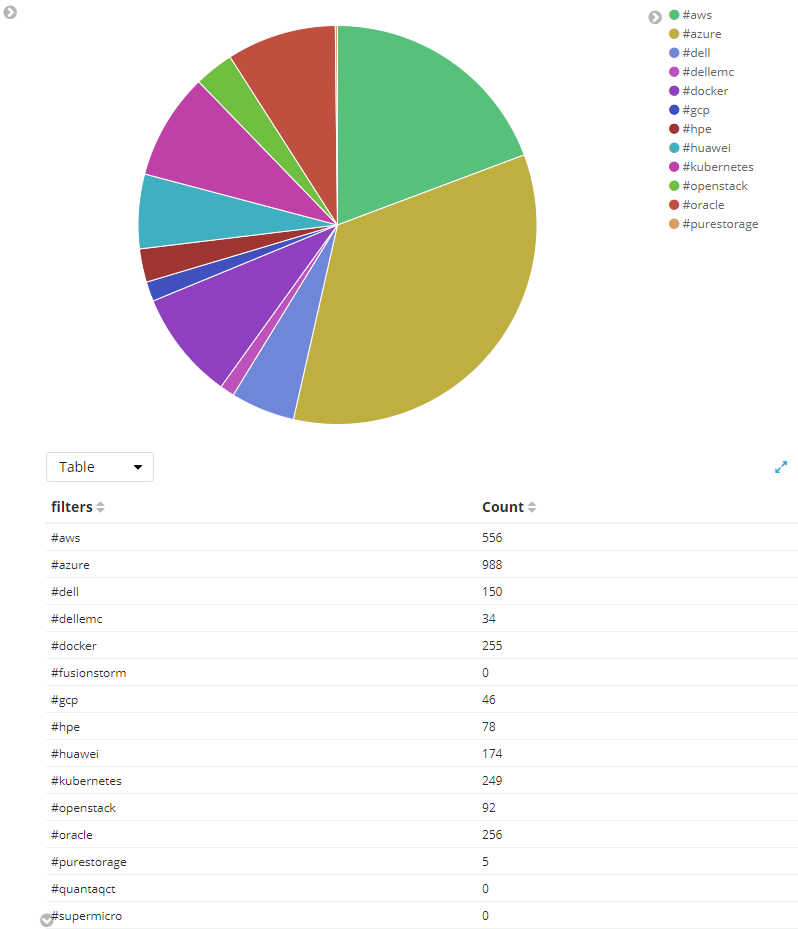
So now we arrive at the origin of this blog. I have to make personal and professional bets on where the market is going, what is most relevant and where I should focus my time. Of course, I have a subjective opinion on where I believe the market is going but I like to validate my opinions with some data and with so many people, organizations and news outlets selling their version of the future the question becomes, how do I validate my opinions objectively. Social chatter is meaningful to me as is sentiment analysis. The great news is with a little Python, the use of some APIs and the ELK stack it’s pretty easy to collect data from social media platforms, store it, analyze it and draw some conclusions. One such question that is very relevant to me is what technologies and what OEMs (original equipment manufacturers) have mindshare? I’ve been pulling social media data for a few weeks using #hashtags to see what techs and OEMs have the most buzz; I have also been doing sentiment analysis to see if the buzz is good or bad.
Here is my view of the market using social media buzz to determine mindshare (it actually feels pretty on the money):
This blog is the result of a restless night where I pondered a recent event where the idea (or existence) of NOC (Network Operations Center) was conveyed as a key component of the ITSM (Information Technology Service Management) paradigm. I find this to be an uber interesting topic and position given that the world has moved (and continues to move) in every way from a centralized to a disaggregated and distributed model. I believe this is true in computing (think cloud, microservices, twelve-factor apps, etc…) and it’s true in the area of human capital management and service delivery.
I thought I would share some of my opinions on the topic, my position as well as some anecdotes that I believe support my thoughts.
First, let me start by saying that we are engaged in a war, a war for human capital, a war where the best knowledge workers don’t look anything like what they looked like twenty years ago, they live in the shadows, digital nomads inhabiting a digital universe.
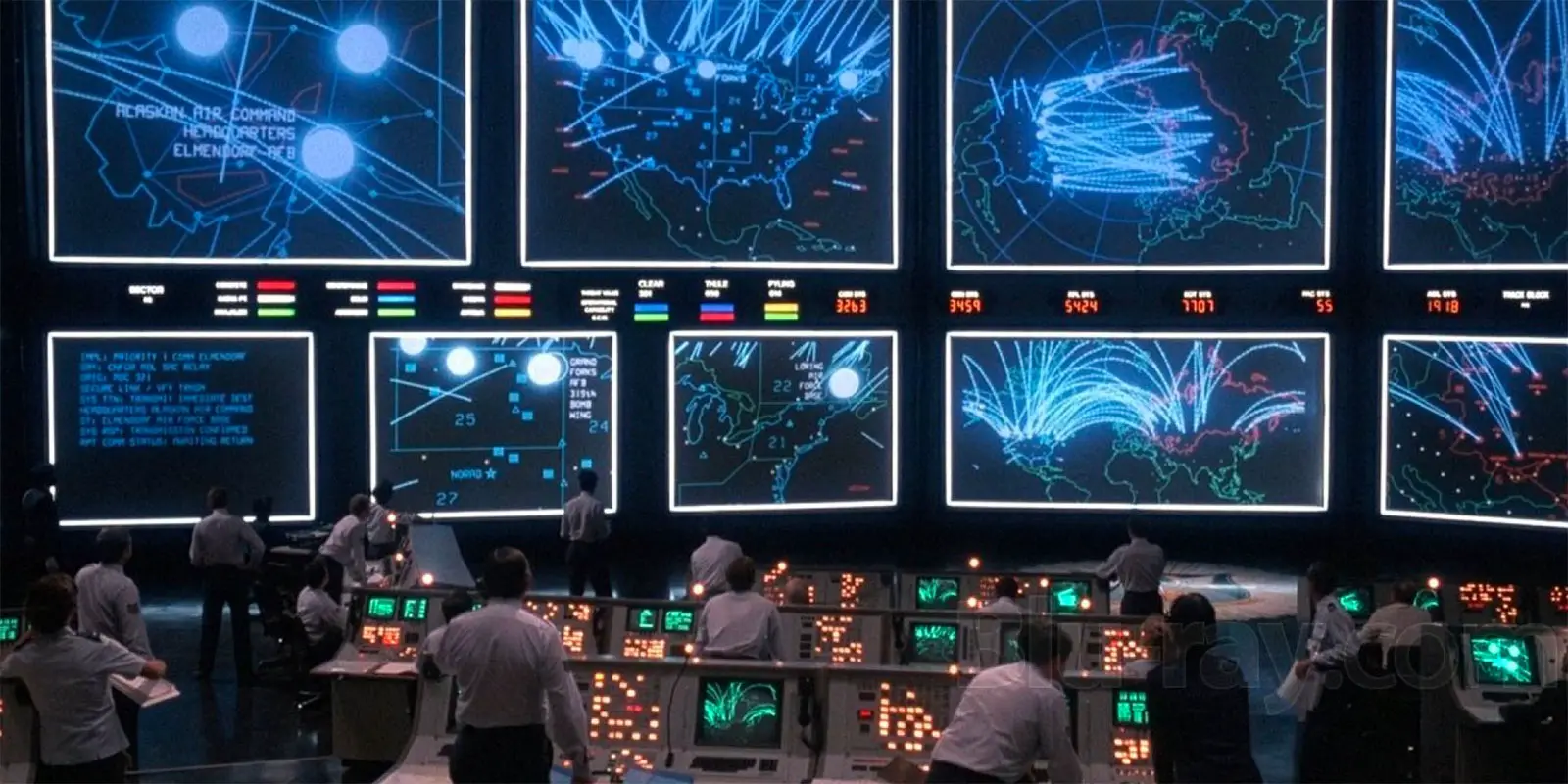
When I think NOC, here is what I envision:
The above is a picture of the NOC from the movie WarGames which was released in 1983, this was cool and impressed the audience, but it was 35 years ago! It’s probably obvious from looking at my blog header that I am a big WarGames fan. Let’s stay with the Hollywood portrayal of tech for a moment because I think it’s relevant.
Fast forward from 1983 to 2001, 18 years later, and the NOC has given way to the lone hacker, with umteen monitors (quite a setup) working alone to High Voltage by The Frank Popp Ensemble.
Disaggregation and decentralization have become a pervasive theme, message and a way of life. Nowhere is this more evident in than in the Open Source community. Disaggregation and decentralization coupled with a shifting culture that has shifted the motivation of the knowledge worker has given way to an unprecedented pace of innovation which would otherwise be impossible.
Couple what the Open Source movement has taught us about the power of disaggregated and decentralized teams with “the surprising truth about what motivates us” and you’ll realize that the disaggregated and decentralized cultures being built are unlike anything we could have dreamed. The passion, commitment, engagement, communication, execution, and velocity are astounding.
Ask yourself where people (yourself included) go for help, how they build communities, what are trusted sources of information, etc…
Where do developers look for help? StackOverflow, Slack, IRC, Quora, etc…?
Where does the average person look for help? Facebook, YouTube, Twitter, etc…?
These are all platforms which enable the construction of disaggregated and decentralized communities which create cultures, subcultures, increase engagement, provide better time to value, etc… Are there no lessons to be learned here? There are lessons to be learned, and many are learning these lessons and adapting their engagement models.
I am a techie, and I believe that substance will always prevail over style and the question I continually ask myself as I adjust to keep up with a market which is innovating and changing at an unprecedented pace is how to define the culture? Is what we are doing relevant today and does it put us on a trajectory to where we’ll need to be in 24 months?
And now we have arrived at my thoughts regarding the NOC.
JetBlue made a bold move (which others followed) shifting from reservation call centers to hiring booking agents who work virtually, and their customer service is consistently rated the highest in the industry.
Relevant business models do NOT focus on resource colocation; they focus on resource capability, availability, and collaboration. I would go as far as to say that colocation favors style over substance.
The cultures we build need to focus on leveraging technology to deliver a great total customer experience (TCE). I believe that a 5.3” screen in the hands of hundreds of engineers, elegant engagement processes, procedures, and tools deliver a better TCE than a 60” monitors on the wall in a room with ten engineers with landline phones. Cultural agility over environmental rigidity.
The focus and value here is NOT a finite set of L1, L2 and L3 shift workers in a NOC. Big screen TV’s on the wall, the Bat Phone and people sitting at a desk are style decisions which have no direct correlation to the ability to deliver substance. Our focus needs to be on how to engage and nurture the best knowledge workers the market can offer. Our mission needs to be the creation and cultivation of a culture which fosters engagement. Our ability to engage and escalate to a subject-matter expert (SME) at any time, to improve the TCE by building equitable partnerships which deliver distinct value, with a meaningful escalation path that focuses on MTTW (Mean-Time-to-Workaround) while in parallel determining a root cause and resolution lies in our culture.
We must understand that the world has changed. We live in a world where seemingly forward-thinking paradigms are obsolete before they are implemented. The path to success relies on agility and accountability, not rigidity and responsibility.
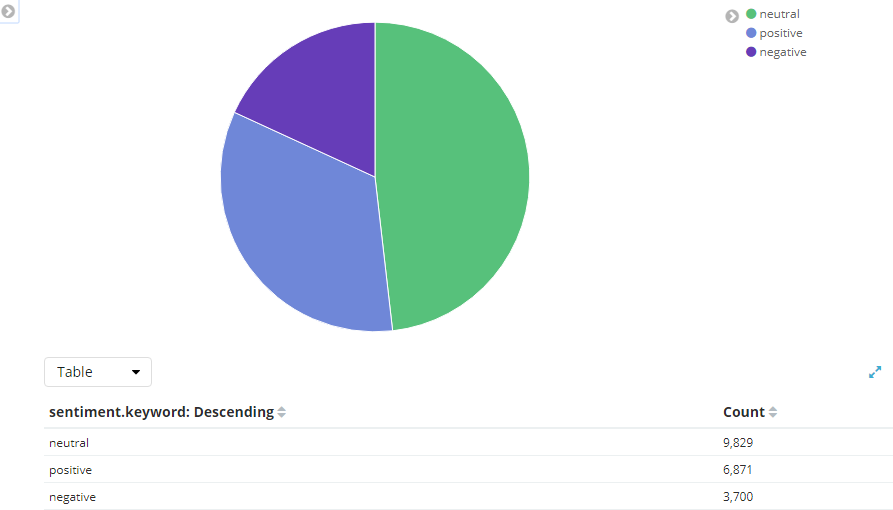
Just finishing up a class where I have been doing a lot of social media mining and analytics and I thought it would be a fun given all the banter about #fakenews to do my own POTUS sentiment analysis.
Open twitter stream with python and tweepy and grab tweets with #trump & #potus hashtags
Note: The above processes are running and the visualizations below are live. Refresh page to refresh data.
Potus Sentiment
Disclaimer: This is real data pulled from the twitter API. I can assure you there is zero motivation or interest here beyond the raw data, the sheer volume of data given the topic, and of course I realize this is relevant to many others which is what makes it interesting.
It’s been a while since I posted, I think I got to caught up in writing lengthy posts (which I often never completed) rather than just publishing content as I have it and as my personal time allows. This post is the start of a new philosophy.
Last week I had a need to quickly grab some replication stats from RecoverPoint and I thought I would share the process and code I used to do this.
Prerequisites: plink, sed, awk, head, tail and egrep
Note: Because this is not a tutorial I am not going to talk about how to get the requirements configured on your platform. With that said you should have no issues getting the prerequisites work on Windows or Linux (for Windows Cygwin may be a good option).
https://gist.github.com/rbocchinfuso/9369708
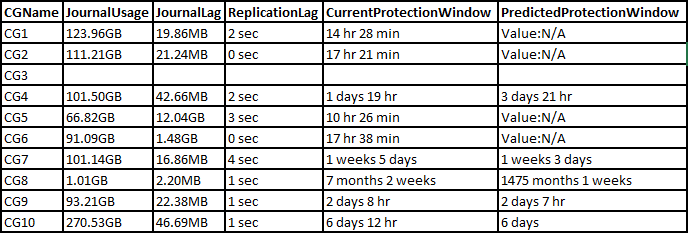
The resulting output is a CSV which can be opened in Excel (or whatever) to produce a table similar to the following:
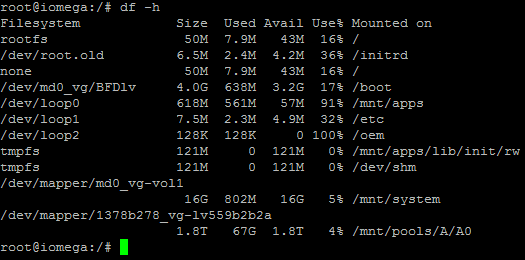
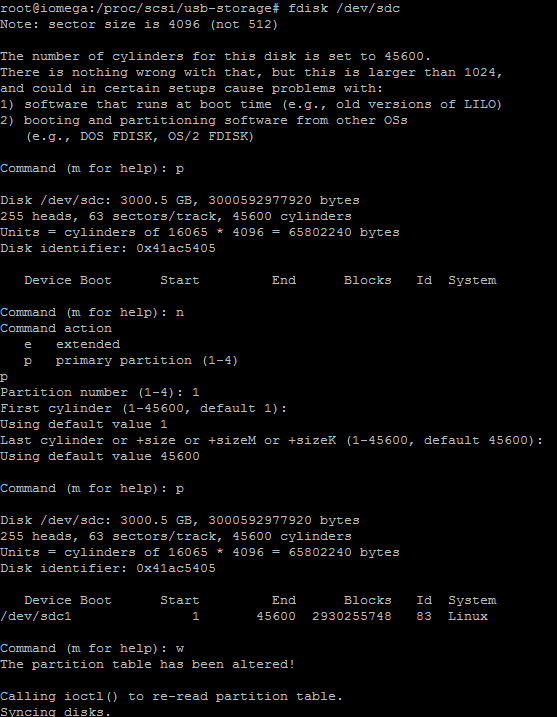
Install EASEUS Partion Master 9.2.1 on Windows 7 desktop
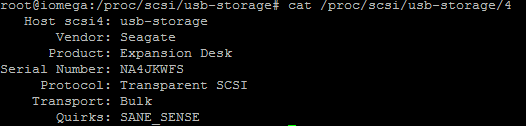
Connect 3 TB Seagate USB drive to Windows 7 desktop
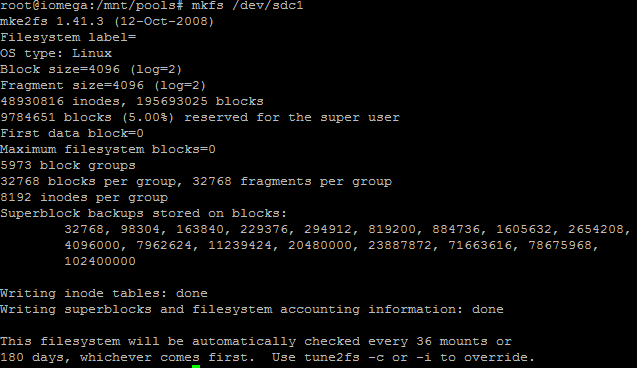
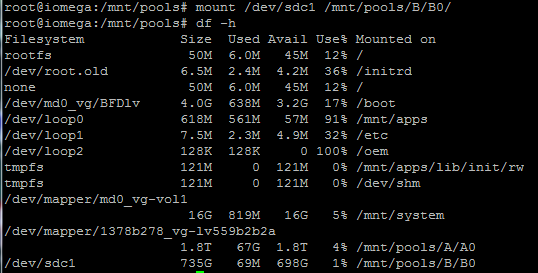
Partition and format partition ext3 using EASEUS Partion Master 9.2.1
Note: This takes a little while.
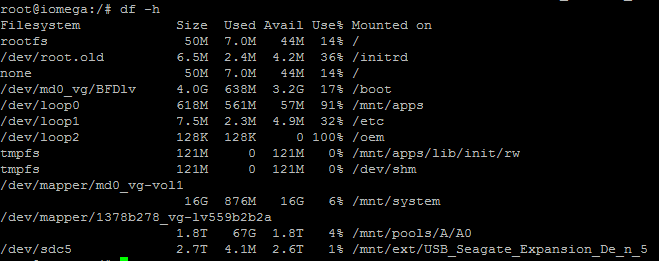
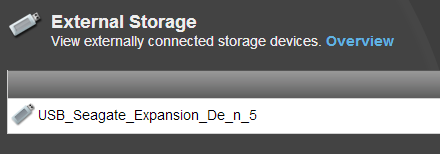
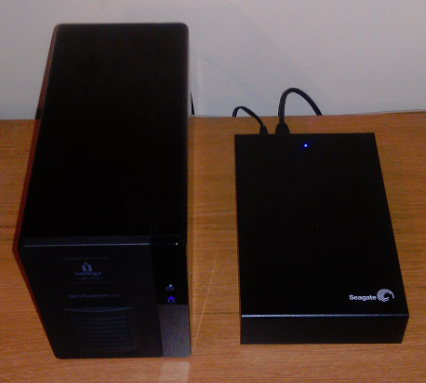
Once complete I connected the drive to my Iomega ix2
Voila!
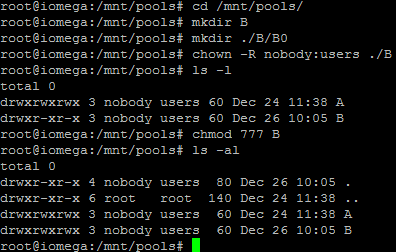
Cleaned up the “/mnt/pools/B directory” I created earlier (“rm -rf /mnt/pools/B”)
Reboot my ix2 (make sure I didn’t jack anything up) and enjoy my added capacity.
Pretty sick footprint for ~ 4.5 TB of storage (1.8 TB of it R1 protected).
This post was driven by a requirement to map RDM volumes on target side in preparation for a disaster recovery test. I thought I would share some of my automation and process with regards to mapping RDM devices that will be used to present RecoverPoint replicated devices to VMs as part of a DR test.
Step 1: Install VMware vCLI and PowerCLI
Step 2: Open PowerCLI command prompt
Step 3: Execute addvcli.ps1 (. .\addvcli.ps1)
function Add-vCLIfunction {
  <#
  .SYNOPSIS
    Adds the VMware vSphere Command-Line Interface perl scripts as PowerCLI functions.

  .DESCRIPTION
    Adds all the VMware vSphere Command-Line Interface perl scripts as PowerCLI functions.
    VMware vSphere Command-Line Interface has to be installed on the system where you run this function.
    You can download the VMware vSphere Command-Line Interface from:
    http://communities.vmware.com/community/vmtn/server/vsphere/automationtools/vsphere_cli?view=overview

  .EXAMPLE
    Add-vCLIfunction
    Adds all the VMware vSphere Command-Line Interface perl scripts as PowerCLI functions to your PowerCLI session.

  .COMPONENT
    VMware vSphere PowerCLI

  .NOTES
    Author:  Robert van den Nieuwendijk
    Date:    21-07-2011
    Version: 1.0
  #>

  process {
    # Test if VMware vSphere Command-Line Interface is installed
    If (-not (Test-Path -Path "$env:ProgramFiles\VMware\VMware vSphere CLI\Bin\")) {
      Write-Error "VMware vSphere CLI should be installed before running this function."
    }
    else {
      # Add all the VMware vSphere CLI perl scripts as PowerCLI functions
      Get-ChildItem -Path "$env:ProgramFiles\VMware\VMware vSphere CLI\Bin\*.pl" | ForEach-Object {
        $Function = "function global:$($_.Name.Split('.')[0]) { perl '$env:ProgramFiles\VMware\VMware vSphere CLI\bin\$($_.Name)'"
        $Function += ' $args }'
        Invoke-Expression $Function
      }
    }
  }
}
Step 4: Execute getluns.ps1 (. .\getluns.ps1)
#Initialize variables
#Replace [INSERT VCENTER SERVER NAME] with your vCenter server name, leave preceding and and trailing "
$VCServer = "[INSERT VCENTER SERVER NAME]"
$objLuns = @()
$objRDMs = @()

#Connect to vCenter Server
Connect-VIServer $VCServer

$clusters = Get-cluster

foreach ($cl in $clusters) {
    $clv = $cl | Get-View
    if ($clv.Host.count -gt 0) {
        #assume that all ESX hosts see the same luns
        $vmhost = get-view $clv.host[0]
        #Get ScsiLuns except local storage
        $ScsiLuns = $vmhost.Config.StorageDevice.ScsiLun  | ? {$_.canonicalname -notmatch "vmhba0"}
        #Get Datastore volumes
        $Datastores = $vmhost.Config.FileSystemVolume.MountInfo
        foreach ($Lun in $ScsiLuns) {
            #Define Custom object
            $objVolume = "" | Select ClusterName,LunName,LunUuid,Lunsize,VolumeName

            #Add porperties to the newly created object
            $objVolume.ClusterName = $clv.Name
            $objVolume.LunName = $Lun.CanonicalName
            $objVolume.LunUuid = $Lun.Uuid
            $objVolume.LunSize = $Lun.Capacity.Block * $Lun.Capacity.BlockSize / 1GB

            foreach ($vol in $Datastores | % {$_.volume}) {
                if ($vol.extent | % {$_.diskname -eq $Lun.CanonicalName}) {
                    $objVolume.VolumeName = $vol.Name
                }
            }
            $objLuns += $objVolume

        }
    }
    #RDM information
    $vms = $cl | Get-VM  | Get-View
    if ($null -ne $vms) {
        foreach($vm in $vms){
            foreach($dev in $vm.Config.Hardware.Device){
                if(($dev.gettype()).Name -eq "VirtualDisk"){
                    if(($dev.Backing.CompatibilityMode -eq "physicalMode") -or
                        ($dev.Backing.CompatibilityMode -eq "virtualMode")){
                        $rdm = "" | select VMName, LunUuid, DiskLabel
                        $rdm.VMName = $vm.Name
                        $rdm.LunUuid = $dev.Backing.LunUuid
                        $rdm.DiskLabel = $dev.DeviceInfo.Label
                        $objRDMs += $rdm
                    }
                }
            }
        }
    }
}

foreach ($rdm in $objRDMs) {
    foreach ($disk in $objLuns) {
         if ($disk.LunUuid -eq $rdm.LunUuid) {$disk.VolumeName = $rdm.VMName + "/" + $rdm.DiskLabel}
     }
}

$objLuns | export-csv "scsiluns.csv" -notypeinformation -useculture

Disconnect-VIServer -Confirm:$false
Step 6: Get SP collect from EMC CLARiiON / VNX array
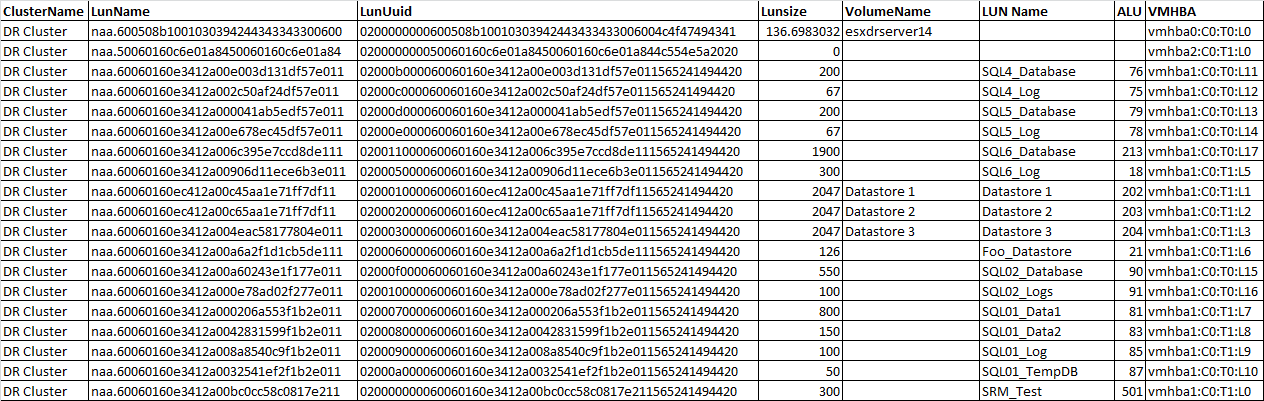
At this point you should have all the data required to map the RDM volumes on the DR side. I simply import the two CSVs generated by the scripts into excel (scsiluns.csv, mpath.csv) as well as the LUNs tab from the SP Collect (cap report).
Using Excel and some simple vlookups with the data gathered above you can create a table that looks like the following:
I could probably combine these three scripts into one but under a time crunch so just needed the data, maybe I will work on that at a later date or maybe someone can do it and share with me.